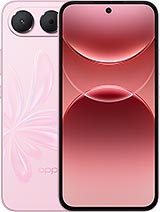
Full Screen Assembly for Oppo A7 Pro 5G (PYE110), 6.57 inches – Premium Quality 📱
Have you dropped your Oppo A7 Pro 5G and now the screen looks like a road map? 😩 Don’t worry, it’s happened to all of us. Here’s a Premium-quality replacement screen designed for the Oppo A7 Pro 5G, with the PYE110 technical reference. Oppo launched this model in 2026, and it features a 6.57-inch display.
This is a full screen assembly, with the display panel and touchscreen glass already fitted together. That means you won’t have to separate the layers or struggle with stubborn adhesive. It works well, responds smoothly to touch and is a very reasonable option for bringing your A7 Pro back to life without spending a fortune.
Here are the key details, so you don’t have to read everything if you’re in a hurry ⚡:
- ✅ Compatible with: Oppo A7 Pro 5G, reference PYE110.
- ✅ Screen size: 6.57 inches.
- ✅ Quality: Premium, suitable for everyday use.
- ✅ Type: Full screen assembly (display + touchscreen assembled).
- ✅ You can install it yourself or take it to a repair shop you trust.
Check that your phone is the Oppo A7 Pro 5G PYE110 🔍
First, here’s a tip that could save you a lot of hassle. Oppo uses very similar names across its A series and also releases different versions for different countries. So even if your phone is called the “A7 Pro”, it’s worth checking the reference. It’s easy:
- Go to Settings > About device (or “About phone”).
- Look for the Model section.
- If it says PYE110, you’re all set! This screen is the right one for you. 🎯
Is your screen too damaged to open Settings? Check the original phone box or the label on the SIM tray, as these often show the reference. If you’re still unsure, contact us before buying and we’ll be happy to help.
| Feature | Details |
|---|
| 📱 Compatible model | Oppo A7 Pro 5G |
| 🔢 Technical reference | PYE110 |
| 🏷️ Device brand | Oppo |
| 📅 Release year | 2026 |
| 📏 Screen size | 6.57 inches |
| ⭐ Quality | Premium |
| 🧩 Spare part type | Full screen assembly (display + touchscreen) |
When should you replace your Oppo A7 Pro screen? 🤔
A shattered screen is easy to spot, but less obvious faults can also mean that your Oppo A7 Pro screen has had enough. Look out for any of these issues:
- 👆 The touchscreen behaves erratically: it doesn’t respond in some areas, opens apps by itself or registers touches where you haven’t tapped (the infamous “ghost touches”).
- 🖤 Black or coloured spots that weren’t there before and gradually get bigger.
- 📏 Vertical or horizontal lines across the screen, either fixed or flickering.
- ⚫ A black screen even though the phone rings, vibrates or receives notifications.
- 💡 Flickering or brightness changes you can’t control.
- 🧊 Chipped glass around the edges: even if it still works, dirt can get in and the crack is likely to spread.
If one or more of these sound familiar, the problem is almost certainly with the screen rather than the rest of the phone. Good news! The A7 Pro 5G is a recent phone with a large battery and good performance, so it’s well worth repairing instead of retiring it too soon.
Oppo A7 Pro 5G Premium-quality screen: what to expect ⭐
With Premium quality, we aim to offer a good balance between price and performance. This screen has been selected for hassle-free everyday use: WhatsApp, social media, videos, photos, browsing or a bit of gaming.
- 🎨 Good display quality for everyday use, with pleasant, easy-to-read colours.
- 👌 Smooth touchscreen response for typing and swiping without problems.
- 🔧 Easier installation thanks to the pre-assembled glass and display panel.
- 💶 Affordable price, well below the usual cost of an official repair.
A note in the interest of being completely honest: this is a Premium-quality compatible spare part, not an original Oppo factory part. As a result, there may be slight differences in brightness, colour tone or performance compared with the screen originally fitted to your phone. It works well for normal use, which is what most of you are looking for.
What’s included with this screen for Oppo A7 Pro 5G? 📦
- Display panel.
- Assembled touchscreen glass.
- Flex cable for connecting to the board.
We recommend having a tool kit ready (precision screwdrivers, opening picks, a pry tool and a suction cup), as well as screen adhesive. You can find these at iLevante.com too, if you don’t already have them at home. 🛠️
Should you replace the Oppo A7 Pro screen yourself or use a repair shop? 🧑🔧
If you’re handy and have opened a phone before, you can do it yourself and save on labour costs. If it’s your first time, take a moment to think it through: inside the Oppo A7 Pro 5G are very delicate flex cables and a large battery that must be handled with care.
A practical option is to buy the screen here and take it to a repair shop you trust. Many repair shops will fit a part you bring in, so you only pay for the installation. A guaranteed saving! 💰
⚠️ Be aware of the A7 Pro 5G’s water resistance
The Oppo A7 Pro 5G left the factory with a high level of water and dust resistance. Bear in mind that as soon as the phone is opened, its factory seal is compromised. Even if you apply new adhesive, we don’t recommend submerging it or exposing it to water after the repair. It’s better not to risk it. 💧🚫
How to replace the Oppo A7 Pro 5G PYE110 screen, step by step 🔧
If you’ve decided to do it yourself, here’s a general guide. Take your time: patience is your best tool.
- Turn off the phone completely and remove the SIM tray.
- Discharge any static electricity by touching a metal surface or, better still, using an anti-static wrist strap.
- Heat the edges with a hairdryer or a low-temperature heat gun, holding it a few centimetres away and avoiding prolonged heat in one spot. This softens the adhesive.
- Attach the suction cup, lift the screen slightly and insert an opening pick into the gap. Slowly work your way around the edges to loosen it.
- Open the phone carefully without pulling, as the flex cables are still connected.
- Disconnect the battery first, then disconnect the screen flex cable.
- Remove the broken screen and carefully clean away any adhesive and glass fragments from the frame.
- Connect the new screen for Oppo A7 Pro, then reconnect the battery.
- Switch the phone on and test it before sticking anything down: check touch response across the entire screen, the display, brightness, proximity sensor and front camera. 👍
- If everything works, switch it off, apply new adhesive, position the screen and press down evenly.
- Leave the adhesive to set for a few hours, ideally with some gentle pressure on top.
Extra tip: take photos of each step with another phone. If you can’t remember where a screw or connector goes during reassembly, they’ll be a lifesaver! 📸
Frequently asked questions about the Oppo A7 Pro 5G screen ❓
Does it fit other Oppo A series models?
This screen is designed for the Oppo A7 Pro 5G with reference PYE110. We don’t recommend using it with other models, even if their names are similar. Always check the reference in Settings.
Will the fingerprint reader still work?
On compatible screens, the in-display fingerprint reader may not work in the same way. If this is important to you, contact us before buying and we’ll be happy to advise you.
Usually not. Just switch on your A7 Pro and start using it. If you notice anything unusual with automatic brightness, restart the phone and check the display settings.
How long does delivery take?
We offer fast delivery so your Oppo A7 Pro 5G can be back up and running as soon as possible. 🚚💨
• Product Weight: 0.20 kg.The technical specs of Oppo A7 Pro 5G
can help you to choose the correct repair part for your device. Make sure your model reference is the same as this element. Here are some tech specs to help you:
- Brand: Oppo
- Oppo A7 Pro 5G Size: 159.1 x 75.8 x 8.8 mm.
- Release date: 2026, September 08.
- Weight: 205 g.
- Screen specs: AMOLED, 1B colors, 120Hz, 800 nits , 1400 nits.
- Screen size: 6.57 inches, 105.0 cm2.
PVP:
SNK.LCDOPPOA7P562.30€ AvailableInStockNewCondition