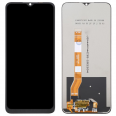
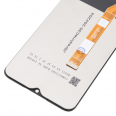
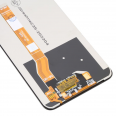
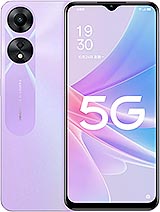
📱 Premium 6.56-inch Oppo A58 5G screen: see your phone as it deserves to be seen again
Crack! 💥 That little sound nobody wants to hear. You dropped your Oppo A58 5G and now the screen looks like a road map, the touchscreen is doing whatever it wants or has simply gone black. Don't worry—here's the solution: a Premium-quality screen for Oppo A58 5G with a 6.56-inch display, designed to get your phone working normally again without costing you a fortune.
This is a replacement specifically designed for the Oppo A58 5G, the model launched by Oppo in 2022. No more “almost compatible” parts that do not fit properly: this screen is made for the A58 5G, so you can replace it yourself or take it to your trusted repair technician.
⚠️ Be careful, as this causes a lot of confusion: the Oppo A58 5G and the Oppo A58 4G are not the same phone and do not use the same screen. Before buying, go to Settings > About phone and check that yours is the 5G version. It only takes ten seconds and can save you a lot of trouble.
🔍 Quick specifications of the Oppo A58 5G screen
| Feature |
Details |
| 📲 Compatible model |
Oppo A58 5G |
| 🏷️ Device brand |
Oppo |
| 📅 Phone release year |
2022 |
| 📏 Diagonal |
6.56 inches |
| ⭐ Quality |
Premium |
| 🛠️ Installation |
DIY or by a repair technician |
✨ Why choose a Premium screen for your Oppo A58?
When you look for a replacement part, you will find countless options, each with a stranger name than the last. Premium quality is usually the option most people are looking for: good quality at a reasonable price. In short:
- 👆 Responsive touchscreen: typing, scrolling through social media or playing a quick game becomes comfortable again.
- 🎨 Sharp images and pleasant colours for photos, videos and TV series.
- 💪 Careful manufacturing, with quality control to ensure reliable everyday use.
- 💸 Sensible price: repair your Oppo A58 5G without paying as much as you would for a new phone.
There is no need to retire your A58 5G because of one accident. With a new screen, it can keep handling messages, calls, music, maps and all the food photos you could possibly need 🍕📸.
🚨 Signs that you need to replace your Oppo A58 5G screen
The glass does not have to be completely shattered before you consider a replacement. Often, the Oppo A58 gives you more subtle warnings. If you notice any of the following, it is time to replace the screen:
- Ghost touches 👻: apps open by themselves, letters appear that you have not pressed or the phone “goes crazy”.
- Unresponsive areas of the touchscreen: for example, you cannot press the bottom part of the keyboard.
- Vertical or horizontal lines in colours that were not there before.
- Black or purple patches that continue to grow, especially after an impact.
- Black screen even though the phone rings, vibrates and receives notifications.
- Drop- or ring-shaped marks after the A58 5G has become wet 💧.
- Cracks in the glass, even small ones: over time, they can spread and may eventually cut your finger.
A friendly tip: do not wait for a small crack to “fix itself”. Spoiler: it will not 😅. Eventually, the problem can affect the touchscreen, making the phone unusable.
🤔 Premium Oppo A58 5G screen or original screen: which is the better option?
This is the usual question. Original screens can be difficult to find and considerably more expensive, and with a mid-range phone such as the Oppo A58 5G, the extra cost is not always worthwhile. A Premium replacement is a very reasonable alternative if you want your phone to work properly again without spending too much.
The important thing is to be clear about what you expect from the replacement part: if you want a fully functional phone, with a good-quality image and a reliable touchscreen for everyday use, the Premium screen for Oppo A58 offers excellent value for money.
🛠️ Should you replace the Oppo A58 5G screen yourself or use a technician?
Everyone has their own style. Some people enjoy having a screwdriver in their hand, while others would rather not touch anything just in case. Both options are perfectly valid:
🧑🔧 Option: “I’ll do it myself”
If you have worked on phones before, replacing the Oppo A58 5G screen is a repair you can carry out at home with patience, good lighting and the right tools. You also get the satisfaction of having fixed it yourself 💪.
🏪 Option: “It is better left to a professional”
Does your hand start shaking just thinking about opening the phone? No problem. Many repair shops will allow you to bring your own replacement part, so you can buy the Oppo A58 screen here, take it to a technician and usually save part of the repair cost.
📋 How to replace the Oppo A58 5G screen step by step
If you decide to do it yourself, here is a general guide. Take your time: rushing is a bad idea when carrying out this type of repair ⏳.
- Turn off the Oppo A58 5G completely. It may seem obvious, but many people skip this step.
- Discharge static electricity using an anti-static wrist strap or by touching a grounded metal surface. Static electricity can damage electronic components.
- Remove the SIM tray so that it does not get in the way.
- Apply gentle heat around the edges using a hairdryer or heat gun from a distance of approximately 5 cm. Do not keep it in one place. This softens the adhesive.
- Insert a thin pick along the side and carefully work your way around the entire edge to loosen the screen.
- Use a suction cup to lift the screen gradually. Do not pull suddenly—the flex cable is underneath.
- Disconnect the flex cable from the motherboard carefully and remove the broken screen.
- Clean away all adhesive residue from the frame so that the new A58 screen sits correctly.
- Connect the new screen to the motherboard connector without touching the contacts with your fingers.
- Turn it on and test it before gluing: check the image, run your finger across the entire screen and test the brightness. If everything works correctly, continue ✅.
- Glue the screen in place using suitable adhesive, apply even pressure and leave it for a few hours so that it bonds properly.
Extra tip: take photos with another phone while disassembling the device. They will be very useful if you later cannot remember where something goes 📷.
💡 Tips to help your new Oppo A58 screen last much longer
Since you are going to make your Oppo A58 5G look like new, take care of the screen so that you do not have to repeat the process next month:
- 🛡️ Fit a tempered glass screen protector: it costs very little and can absorb many impacts that would otherwise reach the screen directly.
- 📦 Use a case with raised edges to protect the corners when the phone falls face down.
- 🔑 Do not keep it in a pocket with keys or coins: they can cause more scratches than you might think.
- 🌡️ Avoid leaving it in direct sunlight inside a car: extreme heat is not good for any screen.
- 🚿 Keep it away from the bathroom while you shower: steam and humidity can eventually cause damage.
🛒 Buy your Oppo A58 5G screen from iLevante
At iLevante.com, we know that a broken phone is a real nuisance: no WhatsApp, no maps, no music and no alarm to wake you up in the morning 😴. That is why we want you to receive your Premium-quality 6.56-inch Oppo A58 5G screen as soon as possible.
Whether you want to repair it yourself or prefer to take it to a technician, this replacement part is a practical and affordable way to give your Oppo A58 a second life. Check that your model is the 5G version, add the screen to your basket and get ready to swipe across a crack-free display once again 🙌.
• Product Weight: 0.20 kg.The technical specs of Oppo A58 5G
can help you to choose the correct repair part for your device. Make sure your model reference is the same as this element. Here are some tech specs to help you:
- Brand: Oppo
- Oppo A58 5G Size: 163.8 x 75 x 8 mm.
- Release date: 2022, November 08.
- Weight: 188 g.
- Screen specs: IPS LCD, 90Hz, 480 nits , 600 nits.
- Screen size: 6.56 inches, 103.4 cm2.
PVP:
SNK.SPS527216.55€ AvailableInStockNewCondition