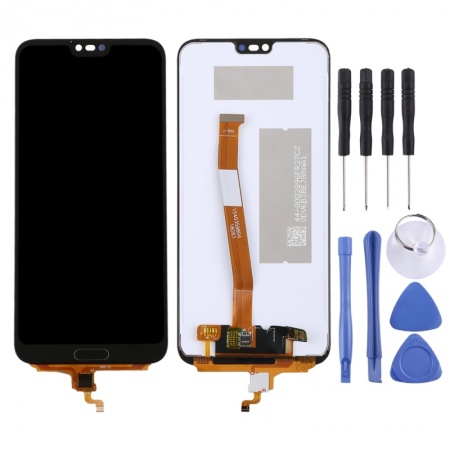
Original Honor 10 screen: the complete replacement to restore your phone to its out-of-the-box condition
The Honor 10 arrived in 2018 with a design that still turns heads today: glass on the front and back, a nearly edge-to-edge 5.84-inch display and a feature few phones had at the time: an ultrasonic fingerprint reader hidden beneath the front glass. That is why its screen is more than just a panel with a touchscreen. When it breaks, your phone loses its picture, touch response and the most convenient way to unlock it.
This complete screen for the Honor 10 is of original quality. It has the same specifications as the screen fitted at the factory: the same panel, resolution, touch response and colour performance. The assembly includes the LCD panel, touchscreen digitiser, backlight and flex cable, already assembled, so you do not have to fit separate layers.
What the Honor 10 screen brings back to your everyday use
At iLevante, we use the original panel’s laboratory figures as a reference, because this replacement should match them. They are:
- 5.84-inch IPS LCD panel with FHD+ 2280 × 1080 resolution and a 19:9 aspect ratio.
- 432 pixels per inch, enough to make small text look sharp.
- Maximum brightness of around 555 nits in the centre and an average of 537 nits across the display, with 94% uniformity.
- 1423:1 contrast ratio and a black level of 0.39 cd/m², very good for an LCD.
- No PWM flicker when you turn down the brightness, which is welcome if you read at night.
In other words, you get back the same brightness and colours you had before the impact. The Vivid display mode in the settings still delivers the saturated tones typical of EMUI. If the notch bothers you, you can still hide it with a black bar in the settings.
The fingerprint reader on the Honor 10 screen: the detail that makes all the difference
Here’s the feature we get the most questions about. The Honor 10’s sensor isn’t under the display, like those in today’s OLED phones. It sits beneath the glass, right at the bottom, marked by an almost invisible dotted line. It works using ultrasound, so it can read your finger even when it’s slightly wet—something capacitive readers of its time couldn’t do.
The problem comes when you repair it: the sensor is bonded to the glass and cannot be transferred from a broken screen to a new one. Many technicians have tried and ended up damaging the reader. With cheaper screens that don’t include a sensor, the phone is left with face unlock as its only option. That’s why at iLevante we recommend the original version if you want to keep using fingerprint unlock.
Tip from our team: after the replacement, go to Settings > Security > Fingerprint, delete your saved fingerprints and register them again. Start with the centre of your finger and gradually turn it towards the edges. The new sensor works better when it learns your fingerprint from scratch.
How to tell if your Honor 10 needs a new screen
Sometimes the glass is intact, but something still isn’t working properly. These are the symptoms we see most often in our repair workshop:
- Black spots, coloured lines or areas that keep spreading, especially after a drop with no visible cracks.
- A dead spot on the touchscreen, often in the centre, or the familiar ghost touches: the phone opens apps by itself.
- The brightness stays fixed, the screen flickers or goes black even though the phone still rings and vibrates.
- Moisture marks that gradually spread after contact with water.
- And, of course, cracked glass, which also stops protecting the fingerprint sensor.
Before ordering, try this quick check. Press and hold the power and volume down buttons for more than 10 seconds to force a restart, then check whether the problem also occurs in safe mode. If the touchscreen fails in every app and at all times, the problem is hardware-related and the screen needs replacing.
Models compatible with this Honor 10 screen
Check the model under Settings > About phone. This screen fits the COL-L29, COL-L19, COL-AL10, COL-TL10 and COL-AL00 variants. Be careful: this mistake is more common than you might think—the Honor 10 Lite and Honor View 10 are different phones, with a different build and screen. Their screens are not interchangeable.
Installing the Honor 10 screen: what to know before opening your phone
Repairing this phone starts from the back. The rear cover is made of glass and has no screws; it is held in place with adhesive. This is the most delicate part of the whole process. The iLevante technical team estimates it takes between one and two hours for someone with some experience. A free screwdriver kit is included in the package, so you’ll have what you need for the Phillips 00 screws. However, you’ll also need opening picks, a suction cup and a gentle heat source.
- Let the battery drop below 25% and switch off the phone. A fully charged battery can be a serious hazard if accidentally punctured.
- Heat one long edge of the rear cover to around 60–80°C: it should feel quite hot but still be touchable. A hairdryer will do. Carefully work in the opening picks without rushing, as the glass can break easily.
- Remove the graphite sheet and the metal plate covering the connectors. Take out the three bracket screws and disconnect the battery first.
- Remove the bottom loudspeaker, which is held in place by seven screws of two different lengths (2.9 and 3.4 mm). Keep them separate, as a long screw in the wrong hole could damage the board.
- Disconnect the screen flex cable and the fingerprint sensor flex cable. Use tweezers for the antenna contact, never a spudger.
- Heat the screen, cut through the adhesive beneath the panel and carefully guide the flex cable through its opening in the frame.
Here’s a tip that helps us avoid many returns: test the new screen before sticking anything down. Connect it, switch on the phone, check the touchscreen from corner to corner and register a fingerprint. Some users lose touch response after the replacement, and it’s almost always because a flex cable hasn’t been seated properly or has been bent during reassembly. You’ll need new adhesive for both the screen and the rear cover, as the original adhesive can’t be used a second time.
We include a FREE screen protector with your order. Apply it to a thoroughly clean, dust-free screen, making sure there’s no dust over the sensor area. A thick or misaligned protector is the most common reason for the ultrasonic reader to stop working. Once it’s in place, register your fingerprints again. The Honor 10 has Gorilla Glass 5 on the front, but its curved rear edges don’t cope well with corner impacts. A simple case can help make this the last screen you need to replace.
• Product Weight: 0.12 kg.The technical specs of Huawei Honor 10
can help you to choose the correct repair part for your device. Make sure your model reference is the same as this element. Here are some tech specs to help you:
- Brand: Huawei
- Huawei Honor 10 Size: 149.6 x 71.2 x 7.7 mm.
- Release date: 2018, May. Released 2018, May.
- Weight: 153 g.
- Screen specs: IPS LCD.
- Screen size: 5.84 inches, 85.1 cm2.
PVP:
SNK.SP4371B17.25€ AvailableInStockNewCondition