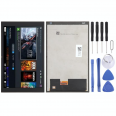
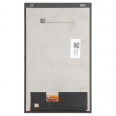
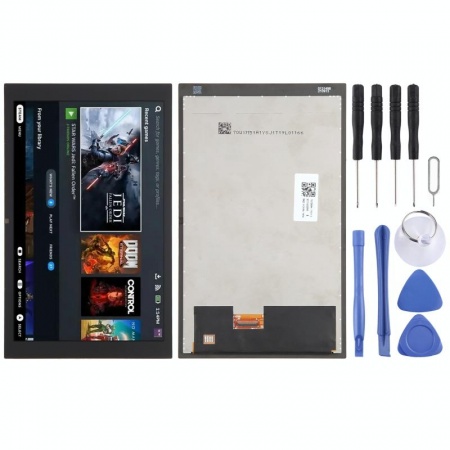
LCD Screen for Steam Deck Glossy Version
Restore your Steam Deck LCD to its original look and image quality with this replacement LCD screen in a glossy finish. This is an original Valve replacement, specifically designed for the Steam Deck LCD and supplied as a screen assembly, front glass, and touch digitizer.
It is an ideal solution to replace a broken, cracked, scratched screen or one with image or touch function issues, allowing you to repair the console without needing to replace it entirely.
✨ Glossy Finish: The Standard Screen of Steam Deck LCD
The original Steam Deck LCD offers two screen finishes. The 64 GB and 256 GB models come factory-equipped with the standard screen with glossy finish glass, while the 512 GB model features an etched glass and anti-glare treatment. Valve confirms this difference in their model specifications.
This is the glossy version, corresponding to the type of screen originally used in the Steam Deck LCD models of 64 GB and 256 GB. Its smooth surface provides a clear and clean image, with vivid colors and a more transparent appearance than the matte finish of the anti-glare version.
The glossy finish is particularly pleasant for indoor gaming, where reflections are easy to manage. It can also offer a sharper and more direct image feeling, especially in texts, interfaces, and games with many details.
What is the Difference with the Anti-glare Version?
The 512 GB Steam Deck LCD came factory-equipped with anti-glare etched glass. This finish is intended to reduce light source reflections, which can be particularly useful when gaming near windows, under intense lighting, or certain outdoor conditions.
The glossy version, on the other hand, uses smooth glass. Without the etched finish, the image can appear visually cleaner and more transparent, although reflections will be more noticeable when there is a light source directly on the screen.
Both options are valid and the choice mainly depends on user preferences and the environment in which the console is used. If you're looking for the standard appearance of the 64 GB and 256 GB Steam Deck LCD models, this is the right version.
Compatible with Different Models of Steam Deck LCD
This glossy finish screen is originally designed for the Steam Deck LCD models with 64 GB and 256 GB, both in the original units and in later internal revisions.
It is also possible to use a glossy screen in a 512 GB Steam Deck LCD. However, there is an important detail: the 64/256 GB and 512 GB screens use different screen flex cables. If a screen of one type is installed in a console of the other type, the corresponding flex cable must be used.
Therefore, if you have a 512 GB Steam Deck LCD and want to replace its anti-glare screen with this glossy version, conversion is possible, but you must ensure you have the compatible screen flex cable for the installed screen.
Compatibility
- 64 GB Steam Deck LCD: compatible.
- 256 GB Steam Deck LCD: compatible.
- 512 GB Steam Deck LCD: compatible using the corresponding screen flex cable.
- 512 GB Steam Deck OLED: not compatible.
- 1 TB Steam Deck OLED: not compatible.
Important: this screen is exclusively for the original Steam Deck LCD. It should not be confused with the Steam Deck OLED replacements, which use a different screen assembly.
When Is It Necessary to Replace the Screen?
Replacing the screen assembly may be necessary when the original screen shows physical damage or malfunctions. Common symptoms are:
- Cracked or broken glass after a fall or knock.
- Deep scratches affecting the user experience.
- Black screen even though the console seems to power on correctly.
- Dead pixels or areas that remain permanently off.
- Vertical or horizontal lines in the image.
- Flickering, flashing, or image cuts.
- Stains, dark areas, or color alterations.
- Issues with the touch panel or unresponsive areas.
- Internal damage caused by a bump even if the outer glass seems intact.
Before replacing the screen, it is advisable to make some checks. If the console powers on but the screen remains completely black, it is worth checking for an image using an external screen. It is also recommended to observe if the system responds to touch, if lines or flickering appear during startup, and if the problem changes when moving the console slightly.
In the event of physical impact, a visible crack, pressure stains, or permanent lines on the screen are clear indications of screen assembly damage. If only the touch function fails but the image is perfect, there may also be a problem with the digitizer.
Genuine Valve Replacement
This replacement is a genuine Valve component for Steam Deck. It is not a generic LCD screen adapted to the console. Genuine Steam Deck replacements distributed through the official repair channel maintain the original component's specifications and compatibility. iFixit, the official Steam Deck partner, identifies this replacement as a genuine part and specifies Valve as the manufacturer.
The assembly integrates the LCD screen and the touch digitizer, allowing for the restoration of both the image and touch functionality of the console.
Screen Specifically Designed for Steam Deck
The Steam Deck LCD screen uses an IPS LCD panel with optical lamination. This technology allows the displayed content to be perceived clearly and close to the glass surface, offering a good experience for gaming, SteamOS navigation, emulation, applications, and multimedia use. Valve confirms that the LCD models use this type of screen and that the 512 GB model adds the anti-glare treatment.
As the glossy version, this screen retains the characteristic smooth finish of the 64 GB and 256 GB Steam Deck LCD models. It is an especially interesting option for those who prefer a brighter, cleaner, and more transparent image compared to the matte finish of the 512 GB version.
Basic Guide to Replacing the Screen
Replacing a Steam Deck LCD screen requires partially disassembling the console and separating the screen assembly from the frame using heat and appropriate tools. The repair is of moderate difficulty and can take approximately 2-3 hours, depending on experience and the console's condition.
- Fully power off the Steam Deck and disconnect all cables and accessories.
- Remove the back cover using appropriate screwdrivers and opening tools.
- Disconnect the battery before handling internal components.
- Remove the necessary internal elements to properly access the screen flex cable.
- Disconnect the screen cable from the board.
- Apply heat in a controlled way to soften the adhesive that holds the screen to the frame.
- Carefully separate the original screen using appropriate opening tools. It is important not to apply excessive pressure on the panel.
- Completely clean any adhesive residue from the frame before installing the new screen.
- Install the new adhesive and place the replacement LCD screen, carefully checking its alignment.
- Connect the corresponding flex cable. If switching between a 64/256 GB screen and a 512 GB screen, especially check the flex cable compatibility.
- Before fully reassembling the console, turn it on and check the image, brightness, touch response, and absence of any anomalous pixels or lines.
- Once operation is confirmed, reattach the cover and complete the repair.
It is advisable to work with electrostatic discharge (ESD) protection and use appropriate tools to avoid damage to the board, flex cables, or new screen. iFixit's official repair guide details the entire procedure and confirms that the replacement process is equivalent for standard and anti-glare screens.
What Version Do I Need?
If you have a 64 GB or 256 GB Steam Deck LCD and want to replace the screen while maintaining the original finish, this is the suitable option: LCD + glossy glass.
If you have a 512 GB Steam Deck LCD, your console originally has the anti-glare glass. However, you can install this glossy version if you prefer the visual characteristics of the smooth finish. In that case, ensure you are using the compatible screen flex cable with the installed assembly.
Glossy vs. Anti-glare
| Characteristic | Glossy | Anti-glare |
| Surface | Smooth and shiny | Etched and matte |
| Reflections | More visible | Reduced |
| Perceived image | Cleaner and more transparent | More diffuse due to matte finish |
| Recommended use | Indoors and environments with controlled lighting | Bright environments or with reflections |
| Original model | 64 GB / 256 GB | 512 GB |
In summary: this is the original Steam Deck LCD screen with glossy finish, corresponding to the type used factory-installed in the 64 GB and 256 GB models. It is an excellent option to replace a damaged screen or to transform a 512 GB Steam Deck LCD that currently uses anti-glare glass, always considering the flex cable compatibility.
• Product Weight: 0.40 kg.
PVP:
SNK.AS13642031.90€ AvailableInStockNewCondition