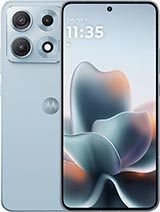
Full Screen for Motorola Edge 70 Max: Bring Your Mobile Back to Life
If the screen of your Motorola Edge 70 Max is broken, has lines, unresponsive areas, or appears completely black, this full screen in black color is the part you need to restore your phone to like-new condition. With this replacement, you can replace the damaged screen and enjoy your mobile again without spending as much as on a new device.
Main Features of the Motorola Edge 70 Max Full Screen
- Type of replacement: full screen for Motorola Edge 70 Max
- Color: black
- Approximate weight: 110 g (including packaging)
- Compatibility: exclusive for Motorola Edge 70 Max
- Includes: screen panel and touch digitizer already assembled
Being a full screen, you will have both the image part and the touch part in one single piece, making installation easier and reducing functional problems.
When to Replace the Screen of Your Motorola Edge 70 Max
This replacement is ideal in many everyday situations: a silly drop on the floor, a bump with keys in the bag, pressure when sitting with your phone in your pocket… If any of these happen, you probably find yourself in one of these situations:
- Broken or cracked screen that is bothersome to use.
- Ink stains or black areas due to internal panel damage.
- Constant color lines or flickers in the image.
- Touch failure: the screen does not respond or does so erratically.
- Black screen even though the phone keeps ringing or vibrating.
In any of these cases, this full screen for Motorola Edge 70 Max is the solution to restore visibility and touch control to your mobile.
Screen Testing Process for Motorola Edge 70 Max Before Installation
Before definitively assembling the part, it is very important to perform a cold test. The recommended procedure is as follows:
- 1. Do not remove the protective plastics or screen stickers.
- 2. Connect the screen flex to the corresponding connector on your Motorola Edge 70 Max motherboard.
- 3. Turn on the mobile and check that the image appears correctly.
- 4. Test the touch by navigating through menus, typing, and swiping the screen.
- 5. Make sure not to excessively bend the flex; a greater than 90° angle can cause black screen or lines.
If during this test your Motorola Edge 70 Max turns on and everything works normally, you can proceed with the final installation of the part.
Advantages of Installing a Full Screen on Your Motorola Edge 70 Max
Replacing just the glass is complex and risky, which is why this full screen is the most practical option for most users. Some of its advantages include:
- Perfect fit for the Motorola Edge 70 Max model.
- Clear picture and accurate colors for enjoying your apps, videos, and games.
- Precise touch response, ideal for daily use, work, and gaming.
- Easier assembly as screen and touch are already assembled.
- Cost savings compared to buying a new phone.
Thus, by replacing the screen of your Motorola Edge 70 Max, you extend the device's lifespan and continue using your data, apps, and settings without loss.
Comparison: Continuing with a Broken Screen vs. Switching to a New Full Screen on the Motorola Edge 70 Max
| Situation | Continue with damaged screen | Switch to a new full screen |
| User experience | Erroneous touches, poor visibility, risk of cuts | Clear image and precise touch, comfortable use |
| Durability | Breakage may worsen over time | Phone ready to keep working for years |
| Cost | Zero expense, but phone becomes less usable over time. | Moderate investment that avoids buying a new phone |
| Safety | Possible entry of dust and moisture into the interior | Sealed and protected front structure |
Order Your Screen for Motorola Edge 70 Max at iLevante 📦
At iLevante you'll find this full screen for Motorola Edge 70 Max in black ready to ship, with careful packaging to ensure the part arrives in perfect condition. Opting for a good replacement is the best way to continue enjoying your mobile, extending its lifespan and avoiding a larger expense on a new terminal.
If your screen is broken, looks bad, or the touch fails, this part is just what you need to get your Motorola Edge 70 Max working like the first day again.
• Product Weight: 0.13 kg.The technical specs of Motorola Edge 70 Max
can help you to choose the correct repair part for your device. Make sure your model reference is the same as this element. Here are some tech specs to help you:
- Brand: Motorola
- Motorola Edge 70 Max Size: 164 x 77 x 8.3 mm.
- Release date: 2026, July 15.
- Weight: 221 g.
- Screen specs: LTPO AMOLED, 1B colors, 144Hz, PWM, HDR10+, 7000 nits.
- Screen size: 6.82 inches, 113.0 cm2.
PVP:
SNK.AS18372165.95€ AvailableInStockNewCondition