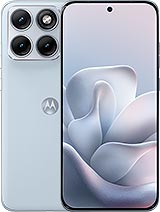
Display for Motorola Edge 70 Fusion: Repair Your Phone in Style!
Oh no! 😱 Did you drop your Motorola Edge 70 Fusion, and now the screen looks like an abstract puzzle? Don't worry, friend; at iLevante.com, we have just what you need: a Premium quality replacement screen for Motorola Edge 70 Fusion. This model, released in 2026 under the Motorola brand, is a true champion with its impressive 6.78-inch display. Perfect for reviving your Edge 70 Fusion (or as some call it, the Motorola Fusion Edge 7• and getting back to enjoying uninterrupted videos and games. And look out, with technical references like XT2605-1, XT2605-2, or XT2605-4, this screen is similar to the original in quality but at a price that won’t leave your wallet empty. Let's dive into the details in a fun and useful way!
Why Choose This Premium Screen for Your Motorola Edge 70 Fusion?
Imagine this: your Motorola Edge 70 Fusion is like a 6.78-inch superhero, ready to conquer the digital world since its launch in 2026. But even heroes need a replacement when things get rough. Our Premium quality screen is a fantastic option because it offers a clear and responsive visual experience, similar to what you'd expect from a good quality replacement. It's not the factory original, but it's designed to fit models like the XT2605-1, XT2605-2, or XT2605-4 perfectly. What's the best part? It comes with everything you need, so you don't have to complicate your life. 😎
This screen includes the main panel, touch glass, image controller, and connection flex cable. Ah! And let's not forget an extra screen protector to start on the right foot. It's ideal if you're looking for something durable without going straight to an official Motorola service, which can sometimes be a hassle with endless waits.
Did you think we were going to leave you alone on this mission? Not at all! With every screen for Edge 70 Fusion, we give you a super handy tool kit. It includes precision screwdrivers, picks for separating pieces, soft prying tools, and a magical suction cup that makes everything easier. It's like having a sidekick in your pocket. 🛠️ If you're brave enough to repair your Motorola Fusion 70 on your own, you'll love this. And if not, take it to a technician and save on labor by bringing your own replacement.
Signs That Your Motorola Edge 70 Fusion Screen Needs an Urgent Change
We've all been there: a stumble, a silly bump, and suddenly your faithful Motorola Edge 70 Fusion (released in 202• isn't responding like it used to. But how do you know it's time for a new screen? Here's a fun list of symptoms screaming "Help!" – don't ignore these signs, or your phone could end up in the gadget graveyard. 😂
- The rebellious touch: If you touch and nothing happens, or it responds as if it has a life of its own, it's time to act!
- Mysterious stains: Do black, blue, or strange-colored spots appear that weren't there before? It could be a farewell to the current screen.
- Unwanted aquatic effects: If your Edge 70 Fusion got wet and now you see circles or drops on the screen, it's not a cool filter; it's a problem.
- Treacherous light leaks: Lights escaping through the edges or dark zones – like a permanent eclipse on your 6.78 inches.
- Faded colors: If the edges look dull or the colors don't shine like in 2026, something is wrong.
These little problems not only ruin the fun but can get worse over time. It's better to change it with our Premium screen for XT2605-1 models and similar and get back to action.
Premium Quality vs. Other Options: What Makes This Screen Special for Motorola Edge 70 Fusion?
In the world of replacements, not everything is the same. Our Premium screen for Motorola Fusion Edge 70 stands out for its good quality, offering a quick touch response and decent visibility even under sunlight. Unlike cheaper options like Incell or AAA, which might have touch issues or less vibrant colors, this is a solid choice for demanding users. Remember, Motorola doesn't sell original replacements to stores like ours, so this Premium is the closest to a similar experience without breaking the bank.
Key differences? Think reduced thickness for a more elegant fit, lower energy consumption for longer battery life, and durability that withstands daily wear. If you're looking for something economical but reliable for your XT2605-2 or XT2605-4, this is your ally. And all with the playful spirit of a 2026 mobile!
Comparison Table: Displays for Motorola Edge 70 Fusion
| Feature | Premium Quality (Ours) | Lower Qualities (e.g., Incell/AAA) |
| Touch response | Fast and precise 😋 | Possible delays or errors |
| Outdoor visibility | Good, with vibrant colors | Less bright, annoying reflections |
| Thickness | Thin for better fit | Thicker, might be noticeable |
| Durability | High, similar to 6.78-inch expectations | Less resistant to impacts |
| Price | Affordable with discounts | Cheaper, but with risks |
This table helps you see why the Premium is the star for your Motorola Edge 70 Fusion. Choose wisely and save headaches!
Take It to a Technician or DIY? Options for Repairing Your Edge 70 Fusion
Some are like MacGyver and love DIY, others prefer to leave it to the experts. If you choose to replace the screen on the Motorola Fusion 70 yourself, great – our kit has your back. But if you're not confident handling a 2026 device with its glorious 6.78 inches, a technical service is your best friend. Many accept replacements like ours (XT2605-1 references, etc.) and only charge you for labor. And the official Motorola? Sure, it's an option, but it might take longer and cost more. You decide the adventure! 🚀
How to Change the Screen of Your Motorola Edge 70 Fusion: Step-by-Step Fun Guide
Ready for action? Changing the screen on your Edge 70 Fusion isn't science fiction, even if it sounds futuristic with that 2026 date. Follow these steps carefully, use the gift kit, and you'll see how your phone comes back to life. Remember: be gentle, like handling a treasure. 😉 Let's go:
- Turn off the phone: First, turn off your Motorola Edge 70 Fusion to avoid short circuits. Safety first!
- Static discharge: Touch something metallic or use an anti-static bracelet. You don't want to fry the circuits with your "superhero energy."
- Apply heat: Use a hairdryer or heat gun to warm the edges of the screen about 5 cm away, no more than 2 seconds per area. This softens the glue without drama.
- Separate with picks: Insert the kit picks along the sides and move them gently from top to bottom. Repeat on all sides of the 6.78 inches – patience is key!
- Use the suction cup: Briefly heat the center and pull with the suction cup to lift the old screen. Pop! Like opening a gift.
- Disconnect and remove: Carefully remove the flex and take out the defective screen. Clean glue residue from the frame.
- Install the new one: Place the Premium screen (for XT2605-4 or similar), connect the flex without touching sensitive parts.
- Test: Turn on the Motorola Fusion Edge 70 and check that everything works: touch, colors, all on its 6.78 inches.
- Glue and wait: Apply new glue and let it sit for 3-4 hours. Voilà, like new!
If you follow this, your screen for Motorola Edge 70 Fusion will be ready for more adventures. See? It's not as scary as it seems. If you get stuck, there are always online videos or a technician nearby.
More Tips to Keep Your Edge 70 Fusion Screen in Shape
Once repaired, take care of your 2026 baby: use protective cases, avoid epic falls, and clean with soft cloths. That way, that 6.78-inch screen will last and last. Have fun with your Premium replacement! 🌟
• Product Weight: 0.20 kg.The technical specs of Motorola Edge 70 Fusion
can help you to choose the correct repair part for your device. Make sure your model reference is the same as this element. Here are some tech specs to help you:
- Brand: Motorola
- Motorola Edge 70 Fusion Size: 162.8 x 75.6 x 7.2 mm or 8 mm.
- Release date: 2026, March 02.
- Weight: 177 g or 193 g.
- Screen specs: AMOLED, 1B colors, 144Hz, HDR10+, 5200 nits.
- Screen size: 6.78 inches, 112.4 cm2.
PVP:
SNK.EDA00614940657.99€ AvailableInStockNewCondition