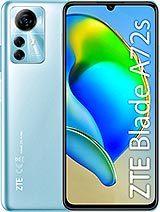
Complete Screen for ZTE Blade A72s in Black: Bring Your Mobile Back to Life
If your ZTE Blade A72s has fallen, the screen is black, shows stripes, unresponsive areas, or broken glass, this complete screen for ZTE Blade A72s is the part you need to make your mobile like new again. With this replacement, you can enjoy your smartphone again without stains, without flickering, and with a smooth and precise touch, just as it came from the factory.
Features of the Complete Screen ZTE Blade A72s
This screen includes everything necessary to change the front of your device without additional complications. It is a complete black screen, specifically designed for the ZTE Blade A72s model, ensuring a perfect fit in both size and internal connectors.
- Type of part: complete screen for ZTE Blade A72s
- Color: black
- Approximate weight: 110 g including packaging
- Guaranteed compatibility: designed only for ZTE Blade A72s
- Specific connector and flex: fits the internal wiring of the model
Being a complete screen, you won't need to separate the glass from the LCD panel or the touch screen: the part comes already assembled to make the change easier and with a much cleaner finish.
How to Check If This Screen for ZTE Blade A72s is the Right One
Before ordering your screen for ZTE Blade A72s, make sure the model of your phone matches exactly. You can check it in Settings > About Phone or on the original box. This replacement is exclusively designed for ZTE Blade A72s and is not valid for other models in the Blade range.
Once you have it in your hands, it is very important to test the part before mounting it permanently. To do this, simply connect the flex cable of the new screen to the connector on the mobile's motherboard, turn it on and check that it looks good, responds to touch across the entire surface, and no lines, stains, or dead zones appear.
Testing Process and Mounting Tips for Your ZTE Blade A72s
The testing phase is key to making sure that the ZTE Blade A72s screen works correctly before sealing the phone completely. Follow these basic points:
- Place the mobile's motherboard on a clean and dry surface.
- Connect the complete screen flex to the corresponding connector on the board.
- Turn on the phone and check the brightness, colors, and touch screen.
- Verify that all touch areas respond to sliding and typing.
- Avoid excessively bending the flex cable: an angle greater than 90º can cause black screen or appearance of stripes.
If everything works correctly in the test, you can continue with the final assembly, sticking the screen to the chassis and reassembling the other components of the ZTE Blade A72s.
Advantages of Changing the Complete Screen on Your ZTE Blade A72s
Opting for a complete screen for ZTE Blade A72s has several advantages compared to continuing to use the mobile with a damaged screen or only changing the glass:
- Better user experience: you see your apps, videos, and games again with clarity and good brightness.
- Increased security: changing the front prevents cuts from broken glass and entry of dust or moisture.
- Saves money compared to buying a new mobile: with just one replacement you extend the life of your ZTE Blade A72s for many months.
- Perfect fit: being a screen specific to this model, it fits perfectly in the original frame without gaps.
Additionally, if you combine this screen change with a sturdy case and a tempered glass protector, your ZTE Blade A72s will be well protected against future falls.
Comparison Table: Staying with a Broken Screen vs. Changing the ZTE Blade A72s Screen
| Situation | Stay with broken screen | Change to complete screen ZTE Blade A72s |
| Visibility | Dark areas, stripes, difficult to read | Clear image, correct colors, and good brightness |
| Touch | Failed or self-triggered taps | Smooth and precise response across the entire screen |
| Safety | Risk of cuts and dirt entry | Intact and sealed front, no loose glass |
| Mobile lifespan | Shortened due to possible internal failures | Extended, maximizing your ZTE Blade A72s |
Buy Your Screen for ZTE Blade A72s at iLevante
At iLevante you will find this complete screen for ZTE Blade A72s in black and many other parts for mobiles and tablets. We work with parts specific to each model, ensuring suitable compatibility and a satisfactory user experience after the change.
If your smartphone has become unusable due to the frontal breakage, changing the screen is one of the quickest and cheapest ways to recover your device. Add this part to your cart, receive the screen at home, and enjoy your ZTE Blade A72s as on the first day.
• Product Weight: 0.13 kg.The technical specs of ZTE Blade A72s
can help you to choose the correct repair part for your device. Make sure your model reference is the same as this element. Here are some tech specs to help you:
- Brand: ZTE
- ZTE Blade A72s Size: 168 x 77.5 x 8.6 mm.
- Release date: 2022, June 19.
- Weight: 198 g.
- Screen specs: IPS LCD, 90Hz.
- Screen size: 6.75 inches, 110.0 cm2.
PVP:
SNK.AS14760719.75€ AvailableInStockNewCondition