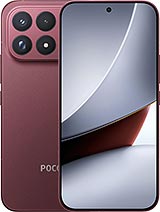
Screen for Xiaomi Poco F9 Ultra – Premium Quality 📱
Has your Xiaomi Poco F9 Ultra suffered a heart-stopping fall? 😱 Don’t worry, take a breath. Here you have a replacement screen for the Poco F9 Ultra with Premium quality that will bring your smartphone back to life as if nothing had happened. With its generous 6.9-inch size, this screen will let you enjoy your series, games and endless social media scrolling again with a first-class visual experience.
The Poco F9 Ultra, launched by Xiaomi in 2026, is a true high-end powerhouse and deserves a replacement part to match. This screen, with technical reference 26077PC53G, is similar to the original and has been manufactured to fit your device perfectly, offering a smooth touch response and colour reproduction that will not disappoint. 🎨
The part comes complete with all the components required for installation: the display panel, touch glass, image controller (IC) and flex connection cable. In short, everything you or your trusted technician needs to carry out the replacement without complications. 🛠️
How do you know if you need to replace your Poco F9 Ultra screen? 🤔
Sometimes the answer is obvious: a fall, a dramatic crack and a spiderweb of fractures that makes it impossible to see even your wallpaper. But at other times, the signs are more subtle. These are the signs that your Xiaomi Poco F9 Ultra screen needs replacing:
- The touchscreen behaves strangely: it does not respond, responds in the wrong place or starts typing by itself as if your phone were possessed. 👻
- Mysterious spots: black, bluish or oddly shaped areas appear where there were none before.
- Vertical or horizontal lines cross the screen like a barcode.
- Light leakage appears around the edges or in specific areas of the panel.
- Flickering or sudden blackouts occur without any apparent reason.
- Liquid damage: if your Poco F9 Ultra got wet and now shows water-drop-shaped marks or circles, the screen is ready for retirement.
- Faded or distorted colours appear around the edges of the panel.
If you recognise any of these symptoms, do not hesitate: your Xiaomi Poco F9 Ultra needs a new screen, and this Premium option is exactly what you are looking for. ✅
Features of the Premium screen for the Poco F9 Ultra 📋
To make everything clear at a glance, here are the key details of this replacement part:
| Feature | Details |
|---|
| Compatible model | Xiaomi Poco F9 Ultra |
| Size | 6.9 inches |
| Technical reference | 26077PC53G |
| Quality | Premium ⭐ |
| Device year | 2026 |
| Included components | Panel, touch glass, IC and flex cable |
Quick tip: before placing your order, check that your model matches reference 26077PC53G. This will ensure full compatibility and help you avoid surprises. 😉
Why choose Premium quality for your Xiaomi Poco F9 Ultra? ⭐
There are replacement part grades to suit every preference and budget, but Premium quality stands out for several reasons worth knowing:
- 🔹 Immediate touch response: every tap, swipe and gesture responds instantly, making it ideal for gaming and intensive use.
- 🔹 Reduced thickness: it integrates neatly with the Poco F9 Ultra chassis while maintaining the device’s original appearance.
- 🔹 Bright colours and good brightness: enjoy your multimedia content with high-quality colour reproduction.
- 🔹 Durability: manufactured with resistant materials to provide long-lasting use.
If you are someone who makes the most of their phone — demanding games, video marathons and photo editing — Premium quality is your best ally. Your Xiaomi Poco F9 Ultra will look as good as it did on the first day. ✨
How to replace the Xiaomi Poco F9 Ultra screen step by step 🔧
Would you like to replace it yourself? Go for it, brave one! 💪 However, keep in mind that this is a delicate procedure. If you do not feel confident, you can always take the replacement part to a repair centre; many accept customer-supplied parts, helping you save on some of the cost. But if you want to try it yourself, follow these steps carefully:
Preparation before starting
- Switch off your Poco F9 Ultra completely and remove the SIM tray.
- Discharge any static electricity from your body by using an anti-static wrist strap or touching a metal surface. Static electricity can damage the internal components.
- Prepare your workspace: it should be clean and well lit, with all the tools you need to hand, including screwdrivers, picks, a suction cup and a heat gun or hairdryer.
Removing the damaged screen
- Apply gentle heat around the edges of the screen using a heat gun or hairdryer, keeping it approximately 5 cm away and not heating the same spot for more than 2 seconds. This will soften the adhesive.
- Place the suction cup close to one edge and pull gently to create a small opening.
- Insert a plastic pick into the opening and slide it around the entire perimeter to separate the adhesive. Repeat the process along all four sides patiently.
- Once it is loose, carefully lift the screen and disconnect the flex cable from the motherboard. Remove the old screen completely.
Installing the new Premium screen
- Clean the Poco F9 Ultra frame thoroughly, removing any old adhesive residue.
- Connect the flex cable from the new screen to the motherboard, avoiding touching the metal contacts with your fingers.
- Before applying any adhesive, switch on the phone and test that everything works correctly: image, touchscreen, brightness and more. Complete check! ✅
- If everything works perfectly, apply the new adhesive, position the screen in place and press gently around the edges.
- Wait 3 to 4 hours for the adhesive to set properly before using the phone normally.
And that’s it! Your Xiaomi Poco F9 Ultra will have a brand-new screen, and you will enjoy the satisfaction of having done it with your own hands. 🎉
Buy your Poco F9 Ultra screen from iLevante 🛒
At iLevante.com, we are clear about one thing: a broken phone does not have to ruin your week. That is why we offer this 6.9-inch Premium screen for the Xiaomi Poco F9 Ultra, with reference 26077PC53G, at the best price and with the confidence of buying from a shop specialising in replacement parts.
Do not let a fall keep you apart from your digital companion. Place your order today and enjoy your Poco F9 Ultra with a full screen again. 🚀
• Product Weight: 0.20 kg.The technical specs of Xiaomi Poco F9 Ultra
can help you to choose the correct repair part for your device. Make sure your model reference is the same as this element. Here are some tech specs to help you:
- Brand: Xiaomi
- Xiaomi Poco F9 Ultra Size: 163.5 x 77.9 x 8.7 mm.
- Release date: 2026, September 01.
- Weight: 235 g.
- Screen specs: AMOLED, 68B colors, 185Hz, Dolby Vision, HDR10+, 850 nits , 2200 nits , 4500 nits.
- Screen size: 6.9 inches, 116.6 cm2.
PVP:
SNK.AS184852152.16€ AvailableInStockNewCondition