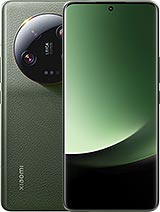
Premium Xiaomi 13 Ultra screen for model 2304FPN6DC
The first thing we check at iLevante when someone is looking for a Xiaomi 13 Ultra screen is the model number. This screen is compatible with 2304FPN6DC, the Chinese version of the phone. You can check yours in Settings, under About phone. Does yours show 2304FPN6DG, the global version's model number? Contact us before placing your order.
The next thing you should know before buying is that this is a complete screen without a frame, and it is not compatible with the fingerprint reader or the curvature of the original screen. You will need to unlock your phone using a PIN, pattern or facial recognition, so set this up before opening the phone. The fingerprint sensor on this model also measures your pulse, so you will not be able to use that feature either. If you use fingerprint unlocking every day, this is not the screen for you.
Brightness and image quality of the Xiaomi 13 Ultra screen
The 13 Ultra launched with a C7 panel developed in partnership with China Star and reserved for this model. It was one of the phone's key features in 2023, which is why brightness is the specification we're asked about most. Here are the figures for our Premium screen:
- 450 nits typical brightness, adjusted using the manual brightness control.
- 1,170 nits in High Brightness Mode (HBM), which activates automatically outdoors in bright conditions.
- 2,340 nits peak brightness, a momentary level that is not sustained continuously.
- 6.73 inches, AMOLED technology and 120 Hz, with HDR10+ and Dolby Vision support.
Every unit undergoes two checks: one at the factory and another at our warehouse. The box contains the AMOLED panel, touch glass, display IC and connection flex cable. A screen protector and tool kit are included free of charge. Adhesive is sold separately and you will need it: you can add the 3 ml B-7000 adhesive available in our shop to the same order.
When should you replace your Xiaomi 13 Ultra screen?
Common signs include an unresponsive or erratic touchscreen, black or coloured spots, vertical lines and distorted colours around the edges. A quick test can help rule out a software issue: take a screenshot and view it on another device. If the line appears in the image, try restarting or updating the system. If the screenshot is clear, the fault lies with the display panel.
A knock is not always needed for this to happen. A green line has been reported on a Xiaomi 13 Pro with no visible damage, which its owner linked to a software update. A drop can also damage the panel internally while leaving the glass intact.
How to replace the Xiaomi 13 Ultra screen
This surprises many people: this phone opens from the back. The screen flex cable connects to the motherboard, so trying to remove the screen from the front is the easiest way to break something. This is an advanced repair, and if you have never glued a phone back together, we recommend taking it to a technician. As well as the tool kit, have a heat source, isopropyl alcohol and adhesive ready.
- Prepare and heat the back cover. Switch off the phone, ideally with the battery at a low charge. Apply heat using a heating mat at 80°C for 3–4 minutes, or use a heat gun on a low setting, keeping it moving at all times.
- Open the back cover. Lift the bottom edge and insert a plastic pick. Work around the edges, taking care not to push it in too far near the circular camera module.
- Remove the covers. Remove the Phillips #00 screws from the motherboard covers and carefully lift off the wireless charging coil, which is often stuck to the battery.
- Disconnect the battery, then the screen flex cable. Follow this order. On some revisions, the flex cable runs underneath the battery, so you may need to remove it.
- Remove the screen. Heat the front edges to around 90°C and use a suction cup and a plastic card or blade to lift the screen. Work slowly along the top and bottom, where the earpiece grille and flex cable are located. Then feed the cable through the slot in the frame.
- Clean the frame. Remove all the old adhesive with isopropyl alcohol, especially in the corners, and clean the speaker grille if it contains glass dust.
- Test the screen before gluing it in place. Connect the flex cable and battery, switch on the phone and check the touchscreen around the edges, brightness and pixels. Then switch it off and disconnect the battery again.
- Glue the screen in place and close the phone. Use a pre-cut adhesive gasket or a thin, continuous bead of B-7000, avoiding the camera and sensor openings. Reconnect everything, refit the covers and seal the back with fresh adhesive. Keep it held in place for 30–60 minutes.
Common mistakes when installing the Xiaomi 13 Ultra screen
The eco-leather back cover can cause more problems than you might expect. A suction cup may not grip it well, and too much heat in one spot can melt or loosen it. Keep the heat moving and use plastic tools as soon as you can.
Metal tools used along the curved edge can chip the frame's coating. Since the screen comes without a frame, you will need to reuse your existing one: check that it is not bent, as a deformed frame can crack the new glass.
Bear in mind that the phone loses its IP68 rating as soon as it is opened. A good seal helps protect it from splashes, but you should no longer get it wet. Apply the screen protector at the end, once the glass is clean and free of adhesive residue.
• Product Weight: 0.15 kg.The technical specs of Xiaomi 13 Ultra
can help you to choose the correct repair part for your device. Make sure your model reference is the same as this element. Here are some tech specs to help you:
- Brand: Xiaomi
- Xiaomi 13 Ultra Size: 163.2 x 74.6 x 9.1 mm.
- Release date: 2023, April 18.
- Weight: 227 g.
- Screen specs: LTPO AMOLED, 68B colors, 120Hz, Dolby Vision, HDR10+, 1300 nits , 2600 nits.
- Screen size: 6.73 inches, 108.9 cm2.
PVP:
SNK.LCDXIA13U39.75€ AvailableInStockNewCondition