
¡¡¡20 YEARS ONLINE!!!
ONLY TODAY: SHIPPING 1€
limited offer to first 120 orders
Complete Screen for Vivo Y500 Pro
OUT OF STOCK
No disponible.
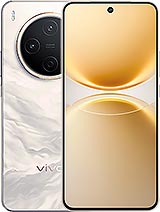
- Includes Free screwdriver kit.
- GIFT: 1 screen protector.
For vivo Y500 Pro
- Screen for Vivo Y500 Pro: Premium Quality Replacement
- Main Features of the Vivo Y500 Pro Screen V2516A
- When Should You Change the Screen on Your Vivo Y500 Pro?
- Premium Quality: Why Choose This Screen for the Y500 Pro?
- Official Vivo Technical Service or DIY?
- Step-by-Step Guide: How to Change the Screen on the Vivo Y500 Pro
- More Details about the Vivo Y500 Pro and Its Screen
Screen for Vivo Y500 Pro: Premium Quality Replacement
Oh no! If your Vivo Y500 Pro screen is shattered, don't worry, iLevante.com has exactly what you need. This replacement screen for the Vivo Y500 Pro, with technical reference V2516A, is premium quality and designed to fit perfectly into your device. Launched in 2025 by the brand Vivo, the Y500 Pro is known for its smooth performance and modern design, and this 6.67-inch screen will help restore that seamless experience. 😊
Unlike cheaper options on the market, our Premium screen offers superior quality, with smooth touch response and vibrant colors akin to what you expect from a Vivo Y500 Pro in optimal condition. It's not the factory original, but it's a reliable alternative that maintains the spirit of the device. If you’re searching for “Vivo Y500 Pro screen” or “Y500 Pro screen replacement,” you’ve come to the right place. We’ll break down everything you need to know to make the best decision.
Main Features of the Vivo Y500 Pro Screen V2516A
This screen for the Vivo Y500 Pro comes ready to use, including essential components such as the LCD panel, the touch digitizer glass, and the flex connection cable. It's ideal for those who want to repair their Y500 Pro without having to search for parts separately. With its 6.67 inches, it covers the full visual area, allowing you to enjoy videos, games, and apps as always. The Premium quality ensures remarkable durability, withstanding daily use on your Vivo Y500 Pro 2025.
What makes it stand out? It offers clear visibility even in bright environments, and its assembly is compatible with the phone chassis. Remember, we're talking about a high-quality replacement, not an original one, but still one that feels premium in your hand. If you’ve been searching for “Premium replacement screen Vivo Y500 Pro,” this is your option. To make it even better, we include a basic tool kit: screwdrivers, suction cups, and picks to get you started on the repair confidently. 🔧
When Should You Change the Screen on Your Vivo Y500 Pro?
It's easy to ignore minor issues, but with the Y500 Pro, a defective screen can ruin your day. If you notice that the touch isn't responding as it should, or if there are dead zones where you touch and nothing happens, it might be time for a change. Other signs include strange spots on the screen, like black dots or distorted colors that weren't there before. Imagine turning on your Vivo Y500 Pro and seeing light leaks at the edges – that’s not normal! 😟
- Erratic touch response: Touches that register in the wrong place or aren't detected.
- Dead spots or pixels: Dark or unusually colored areas affecting visibility.
- Problems after water exposure: Circular stains appearing after a liquid accident.
- Faded colors at the edges: Especially noticeable in the Vivo Y500 Pro model with its 6.67-inch screen.
- Visible fissures: Cracks that not only make the device look bad but compromise its functionality.
These symptoms are common in damaged Y500 Pro screens, and delaying replacement only makes things worse. If you search for “broken screen symptoms Vivo Y500 Pro,” you'll see many users report the same issues. Our Premium screen addresses these issues, bringing your 2025 Vivo phone back to life.
Premium Quality: Why Choose This Screen for the Y500 Pro?
At iLevante.com, we focus on replacements that offer real value. The V2516A screen for Vivo Y500 Pro is premium quality, meaning it has an optimized thickness for responsive touch and efficient energy consumption. We don’t mention exclusive Vivo technologies, but this option is superior to the cheap generics you find out there. Think of it as a reliable upgrade for your Y500 Pro, with sharp colors and brightness that adjusts well to different lights.
To give you a clear idea, here’s a comparative table of key aspects (based on general replacement qualities, not originals):
| Aspect | Premium Quality (Our Option) | Inferior Qualities (e.g., AAA) |
|---|---|---|
| Touch Response | Fast and precise, similar to the daily experience of the Y500 Pro | Slow or inconsistent, with possible failures |
| Durability | High resistance to daily use | More prone to quick damage |
| Visibility | Vibrant colors and good brightness | Washed-out colors, issues in sunlight |
| Price | Balanced with discounts at iLevante.com | Cheaper, but lower quality |
| Compatibility | Perfect for Vivo Y500 Pro (V2516A) | May have inaccurate fits |
As you can see, opting for Premium in your Vivo Y500 Pro screen is worth it if you want something that lasts. If you're searching for “comparison of replacement screens Y500 Pro,” this info will help you decide.
Official Vivo Technical Service or DIY?
Many owners of a Vivo Y500 Pro prefer to handle the repair themselves to save time and money. Taking it to Vivo's official service might mean long waits, especially with a 2025 model like the Y500 Pro. In contrast, with our Premium screen, you can try it at home or take it to a local shop that accepts external replacements. However, if you don't feel comfortable handling the device, a professional is the best route – they know how to handle a delicate Y500 Pro! 👨🔧
Remember, handling the screen involves precautions, such as avoiding damaging the connectors. If you opt for DIY, we back you up with the included kit.
Step-by-Step Guide: How to Change the Screen on the Vivo Y500 Pro
If you decide to venture, here’s a simple guide to replacing the V2516A screen on your Vivo Y500 Pro. It's not an official tutorial, but based on common practices, it will guide you. Make sure to work in a clean, static-free area. Let’s go! 📱
- Power off the device: Press the power button on your Y500 Pro and confirm it’s completely off to avoid shorts.
- Ground static: Use an antistatic wristband or touch a grounded metal object to avoid damaging internal components.
- Apply heat: With a hairdryer or heat gun, heat the screen edges at low temperature (keep a distance of 5-10 cm) for about 30-60 seconds to soften the adhesive. Do not overheat to avoid damaging the Vivo Y500 Pro.
- Insert tools: Use the picks from the kit to gently separate the edges. Move them around the 6.67-inch perimeter, working carefully on each side.
- Lift the screen: Place the suction cup in the center and pull gently while applying a bit more heat if necessary. Disconnect the flex cable with caution.
- Remove the old screen: Clean any adhesive residue from the Y500 Pro chassis using isopropyl alcohol and a soft cloth.
- Install the new one: Connect the Premium V2516A screen flex to the motherboard, ensuring it fits well without forcing.
- Test function: Power on the Vivo Y500 Pro and check touch response, colors, and brightness across the 6.67-inch screen.
- Glue and seal: Apply new adhesive (included or recommended) and press firmly. Let it rest for 2-3 hours for a proper set.
- Enjoy: Once dry, your Y500 Pro will be like new, ready for daily use.
This guide is to orient you; if something goes wrong, consult an expert. Searching “how to repair Vivo Y500 Pro screen” will lead you to similar resources, but with our Premium screen, the process is more straightforward.
More Details about the Vivo Y500 Pro and Its Screen
The Vivo Y500 Pro, released in 2025, is a phone that combines power with an elegant design, and its 6.67-inch screen is key for that immersion. If you’ve had accidents like drops or humidity exposure, this replacement screen saves your day. It's compatible with the reference V2516A, ensuring that your Y500 Pro keeps working without interruptions. Many users look for “compatible screen Vivo Y500 2025” and find that options like ours offer the perfect balance between quality and price.
Also, think about how this repair extends the life of your device. With a Premium screen, you avoid common issues like ghost touches or fading, keeping the Vivo Y500 Pro in optimal shape. If you’re a fan of the Vivo brand, you’ll know that models like the Y500 Pro are made to last, and a good replacement like this supports it. 🌟
Exploring variations, sometimes you call it “Vivo Y500,” “Y500 Pro from Vivo,” or simply “the Pro of 2025” – however you name it, this screen fits. We include everything you need so nothing is missing during installation.
• Product Weight: 0.20 kg.The technical specs of vivo Y500 Pro
can help you to choose the correct repair part for your device. Make sure your model reference is the same as this element. Here are some tech specs to help you:- Brand: vivo
- vivo Y500 Pro Size: 160.2 x 74.5 x 7.8 mm.
- Release date: 2025, November 10.
- Weight: 198.6 g.
- Screen specs: AMOLED, 1B colors, 120Hz, 3840 PWM, 800 nits , 1600 nits.
- Screen size: 6.67 inches, 107.4 cm2.





