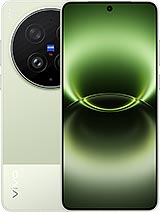
Screen for Vivo X300 Ultra: Premium Quality Replacement
Oh no! Has your Vivo X300 Ultra screen shattered and now looks like an impossible puzzle? 😨 Don't worry, at iLevante.com we have just what you need: a Vivo X300 Ultra Premium quality screen that will save your day. This model, the stunning Vivo Ultra released in 2026, is a beast with its 6.82-inch screen, and our replacement is ready to breathe new life into your device. With technical references like V2547A, V2547DA, V2536A, or V2562, this screen is compatible and high-quality, perfect for you to continue enjoying that impressive phone without any hassle.
Why Choose This Vivo X300 Ultra Premium Screen?
Imagine this: you're scrolling through your favorite socials on your Vivo X300 Ultra, and suddenly... crack! The screen turns into a map of cracks. But hey, all is not lost. Our Vivo X300 Ultra screen is Premium quality, meaning it's a solid and reliable replacement, similar to what you expect from a model like this. We won’t dive into crazy exclusive technology details, but we’ll tell you it offers a clear visual experience on those generous 6.82 inches. The best part? It comes with everything you need to install it without complications, and at a price that won't leave you in the red. 🚀
This Vivo Ultra screen includes the main panel, the touch glass, the IC controller, and the flex connection cable. Oh, and let's not forget an extra screen protector to start off on the right foot. It's ideal for those who want a replacement that feels premium without having to break the bank. If you’re looking for something that fits perfectly in your 2026 Vivo X300, this is your star option.
Components Included in Your Vivo X300 Ultra Screen
- Main screen: 6.82 inches, ready to shine in your Vivo Ultra.
- Touch glass: Responds to touch like a champion, no lags or drama.
- IC controller: The brain that keeps everything running smoothly.
- Flex cable: To connect everything to the mobile without hassle.
- Screen protector: A bonus to keep it spotless from day one. 🛡️
And since we’re pros at iLevante.com, we throw in a tool kit for you to feel like a DIY master. It includes precision screwdrivers, picks for separating parts, soft prying tools, and a suction cup that makes the job easier. No improvising with kitchen knives! 😅
Signs That Your Vivo X300 Ultra Needs a New Screen
Think only an epic drop means you need to change your Vivo X300 screen? Think again! There are plenty of subtle (and not-so-subtle) hints that scream "replacement now!" Let's break them down in a fun way because no one wants a phone acting rebellious. If your Vivo X300 Ultra is acting weird, it might be time for this Premium screen.
- Crazy touch issues: Does sliding your finger do nothing? Or worse, touch where it shouldn't? That's a classic case of a screen in distress. 😤
- Mysterious stains: Black, blue, or multi-colored stains appear that weren't there before. Like your Vivo Ultra went to a paint party!
- Post-shower effects: If it got wet and now shows circles or drops on the screen, it’s a sign water had its way.
- Light leaks: Light escaping from the edges makes it look like a defective Chinese lantern.
- Faded colors: The edges look dull or distorted, robbing your photos and videos of their vibe on those 6.82 inches.
These symptoms in your 2026 Vivo X300 Ultra are no joke; they can ruin your everyday life. But with our Premium quality replacement, back to normal in a flash!
Premium Screen for Vivo X300 Ultra: What Makes It Special?
In the world of spare parts, Premium quality shines like a star. For your Vivo Ultra, this screen offers a premium touch without going overboard on promises. It’s thin, responds quickly to touch, and looks great under the sun, although we won’t compare it directly to the original. If you've tried inferior qualities, you'll know this is a step up: thinner, better energy efficiency, and visibility that doesn't leave you hanging. 🌞
Did you know Vivo launched the X300 Ultra in 2026 with a screen that redefines what you expect from a mobile? Our replacement fits that vibe, with references like V2547A or V2536A for impeccable compatibility. It's perfect for users who want quality without hassle, and yes, it's similar in feel to what you know, but always as a high-level replacement.
Quick Comparison: Screen Qualities for Vivo X300 Ultra | Feature | Premium Quality (Our Option) | Inferior Qualities (e.g., AAA) |
| Thickness | Thinner for a comfortable fit | Thicker, might be noticeable |
| Tactile Response | Fast and precise | Sometimes with delays |
| Visibility in Sunlight | Good, no annoying glare | Can washout in strong light |
| Energy Consumption | Efficient | More battery demanding |
As you can see in the table, opting for Premium in your Vivo X300 Ultra screen is like choosing the VIP seat at a concert. Totally worth it!
Technical Service or DIY? Options for Your Vivo Ultra
Not everyone is a MacGyver with mobiles, right? If changing your X300 Ultra screen gives you vertigo, take it to a technical service. Many accept replacements like ours and charge you just for labor, saving you a ton compared to going directly to Vivo. Or if you’re brave, do it yourself! It’s faster and you’ll feel like a hero. Just remember: handle with care, as these 2026 devices are delicate. 😉
How to Change Your Vivo X300 Ultra Screen: Fun Step-by-Step Guide
Ready for the adventure? Changing your Vivo X300 Ultra screen is not brain surgery, but it requires patience. Follow these steps with our tool kit and you'll be back in action. Remember, it's for the 6.82-inch model with refs like V2547DA. Here we go:
- Power off the beast: First, turn off your Vivo Ultra to avoid crazy short circuits. Safety first! 🔌
- Discharge static: Use an anti-static wristband or touch something metallic. You don’t want to fry your new screen with static electricity. ⚡
- Heat the edges: With a hair dryer or heat gun, apply gentle heat around the sides. Keep your distance and don't exceed 2 seconds per spot to loosen the glue. 🔥
- Insert the picks: Slide the kit picks along the edges and carefully move them to detach. Do this on all edges of your X300 Ultra.
- Use the suction cup: Warm up the center a bit and pull with the suction cup to lift the old screen. Goodbye, cracks!
- Disconnect and remove: Gently remove the flex and take out the defective screen.
- Clean the frame: Remove adhesive residue so the new one fits perfectly on your 2026 Vivo.
- Connect the new one: Attach the Premium screen flex to the motherboard. Don’t touch the copper contacts, they’re sensitive!
- Test and verify: Power it on and check everything works: touch, colors, all on those 6.82 inches. 👍
- Glue and wait: Apply new adhesive and let it set for 3-4 hours. Patience, young padawan!
And voilá! Your Vivo X300 Ultra is as good as new. If something goes wrong, you can always pause and look for a video tutorial—there are plenty out there for this futuristic Vivo model.
More Tips to Keep Your Vivo X300 Ultra Screen in Top Shape
Once installed, treat your Premium replacement like a treasure. Use sturdy cases, avoid epic falls, and clean with soft cloths. Remember, the X300 Ultra is a cutting-edge 2026 phone, so handle it with care. If you’re a fan of customizing, this screen handles extra protectors or even dark modes well to save battery. 😎
Exploring a bit more, did you know the Vivo Ultra with refs like V2562 is perfect for gaming and multimedia? Our screen maintains that essence, ensuring your gaming sessions on 6.82 inches are epic without interruptions.
• Product Weight: 0.20 kg.The technical specs of vivo X300 Ultra
can help you to choose the correct repair part for your device. Make sure your model reference is the same as this element. Here are some tech specs to help you:
- Brand: vivo
- vivo X300 Ultra Size: 163 x 76.8 x 8.2 mm or 8.5 mm.
- Release date: 2026, March 30.
- Weight: 232 g or 237 g.
- Screen specs: LTPO AMOLED, 1B colors, 144Hz, 2160Hz PWM, Dolby Vision, HDR10+, HDR Vivid.
- Screen size: 6.82 inches, 113.0 cm2.
PVP:
SNK.AS183473195.99€ AvailableInStockNewCondition