Your basket

Your shopping cart is empty!
Recommended by iLevante.com

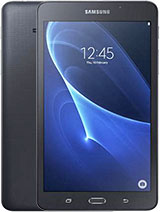
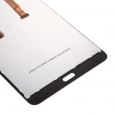
Complete Screen for Samsung Tab A 7.0 / T285

  • Complete Screen for Samsung Tab A 7.0 / T285 1
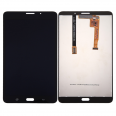
  • Complete Screen for Samsung Tab A 7.0 / T285 2
  • Complete Screen for Samsung Tab A 7.0 / T285 3
  • Complete Screen for Samsung Tab A 7.0 / T285 4
  • Complete Screen for Samsung Tab A 7.0 / T285 5
Complete Screen for Samsung Tab A 7.0 / T285
21.50€
LIMITED OFFER
before 34.90 € (-38 %)
Available
Order it now, we ship it today at 13:45 with expedited shipping available.
  • Includes Free screwdriver kit.
  • GIFT: 1 screen protector.
or
You may also need...
Screen Adhesive for Mobile Phones 3ml B-7000 2.45€
Shipping cost
GB : 0.02 kg a United Kingdom 8.47€
GB : 0.02 kg
España Baleares
España Canarias
España Peninsula
Andorra
France
Italy
Portugal
Austria
Bolivia
Brasil
Chile
Colombia
Costa Rica
Denmark
Ecuador
Estonia
Finland
Germany
Greece
Guatemala
Hungary
Ireland
Liechtenstein
Luxembourg
México
Monaco
Netherlands
Norway
Panamá
Paraguay
Perú
Poland
Puerto Rico
Rep. Dominicana
Romania
Russian Federation
Slovenia
Sweden
Switzerland
Turkey
Ukraine
United Kingdom
Uruguay
Venezuela

Select shipping method and country to see the cost.
This is our commitment with you
Stress free buying
Safe payments with credit card or bank transfer. All protected with SSL security.
Relax when you buy
Our repair parts have passed two quality checks. One at the factory and the second at our warehouse. Make sure it will work perfectly.
Ask us for advice
Not sure if the repair part is for your device? Just write us!
LCD screen and touch screen for Samsung Galaxy Tab A 7.0 (2016) (3G Version) / T285.
The purpose of this repair part is to replace the non-functioning component of the Samsung Galaxy Tab A 7.0 with the new and durable one shown in the picture. Removing and installing it is easy, and you won't have to worry about installation difficulty because Samsung has ensured it can be swapped without issues.
Completely renew your Samsung Galaxy Tab A 7.0. We know you want to keep your Samsung mobile or tablet in perfect shape all the time. So, don’t waste time and give your Samsung a fresh look.
In our online store, we offer this 100% new product so you can receive it and install it immediately.
Every day, we send items that are perfectly functioning and tested for that purpose. We always conduct evaluation and performance tests in several steps to guarantee functionality. In stores and technical services, these parts are only evaluated in manufacturing facilities, but we go beyond; our technicians conduct a second quality inspection to verify all electronic parts, ensuring that you receive a perfect product at your home. For instance, we ensure in a first step that all sensors are functioning well and the external parts are in good condition. This is both an aesthetic and electrical inspection. The external components are also reviewed, ensuring the correct thickness and exact dimensions. This is crucial to avoid problems when you purchase the product.
In our store, we have experience with many customers installing their own Samsung replacement parts, though we know not everyone possesses the same expertise. Considering this, while the vast majority of replacement parts can be replaced by non-professionals, we recommend, if you are not skilled in this area or unsure about the repair, to contact a professional. An authorized technical service will provide an estimate and also offer a warranty for the installation, and although it will cost more, there are other benefits to be gained. We are not responsible for damages caused during installation.

General Tips for Replacing Parts
Tip 1: Always test and keep the protectors on the item to ensure it doesn’t get damaged. Beware of static electricity, it's hazardous for these parts. These parts are very sensitive.
Before beginning the repair, we recommend using an ESD wrist strap. This strap will prevent static electricity from damaging any spare parts like screens, which are delicate.
Additionally, some screens are very thin and sharp.
Tip 2: Replacing a screen is a delicate operation that requires a calm approach. Also, remember that for several models, it’s necessary to remove the battery, as otherwise, the touch function could get damaged. So remove the battery from your phone or tablet, and turn it off to ensure the new screen does not get damaged. Once disassembled, install the part and test it. Sometimes a bad connection can cause it to not start properly. Therefore, it is essential to verify its proper functioning before completing the installation.
Tip 3: Be careful with flex cables: they are special flexible cables, but not extremely so! Do not bend them beyond 90 degrees, as they will break if you do. Often, improper handling can cause internal damage without external signs of malfunction. Handle this delicate part with caution. If you treat it carefully, we are confident you can successfully repair it.


General Type LCD screen and touch screen


We always prioritize the packaging of orders. Therefore, each screen is fully packed for shipping, to prevent damage.


How to Replace the LCD Screen of the Samsung Galaxy Tab A 7.0


To begin, if you already have the complete screen, you should ensure and confirm that the part is correct. This piece is an integrated set, including several parts integrated into one perfect condition piece for the Samsung Galaxy Tab A 7.0. This complete screen features the touch screen, LCD, and flex in a single piece.

Thanks to the benefit of being multiple components in one, the replacement should take no more than about 20 minutes, depending on your experience. Note that various screens require different procedures for repair, but this one, being complete, is the easiest.

You will need a tool kit, but don't worry, it’s not expensive. In fact, check out the product picture because often iLevante includes the necessary set for you to complete the repair. This basic tool kit provides virtually everything you need to successfully replace the LCD.

Moreover, we highlight that every day, many customers (some of them now friends) trust our products to purchase their Samsung Galaxy Tab A 7.0 replacement parts, and by following the advice, you should have no problem replacing it independently. But you have to be patient and careful. Remember, you are handling an electronic item that has failed and includes very small components.


Are You Sure You Need to Repair the Samsung Screen?


Let’s continue with the usual reasons to help you identify if your screen is broken. There are several reasons why it might fail; however, the most common are mentioned here:

Rest assured that if it has been impacted and you can no longer see anything on the screen or it appears visibly broken, there's no doubt about the need for replacement, but what if...

Are there circles on your screen, which might be due to moisture or liquids?
Are there areas on the screen where the colors are duller than before?
Is the touchscreen not responding properly to normal activity in some parts or all over?
Are there horizontal or vertical lines across the screen?
If you notice any of the issues mentioned, you should proceed with restoration. Product Weight: 0.26 kg.

The technical specs of Samsung Galaxy Tab A 7.0 (2016)

can help you to choose the correct repair part for your device. Make sure your model reference is the same as this element. Here are some tech specs to help you:
  • Brand: Samsung
  • Samsung Galaxy Tab A 7.0 (2016) Size: 186.9 x 108.8 x 8.7 mm.
  • Release date: 2016, March. Released 2016, March.
  • Weight: 283 g.
  • Screen specs: IPS LCD.
  • Screen size: 7.0 inches, 142.1 cm2.

PVP: SNK.SPA0041BL21.50 AvailableInStockNewCondition

Brand and model

Spare part type