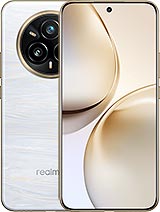
Original Realme 14 Pro Plus screen
The Realme 14 Pro+ (model RMX5051) stands out for its display. It features a 6.83-inch OLED panel, gently curved on all four sides, with such slim bezels that the image seems to float. That is why damage is so noticeable: a chipped corner on this design affects the entire front of the phone. This Realme 14 Pro Plus screen is a complete original replacement part. It comes with the OLED panel, touchscreen and curved glass already bonded together, just as they are on the production line. You will not have to bond the layers by hand or fit parts that only almost match.
What lies behind the Realme 14 Pro Plus screen
Realme put a great deal of work into this model. All four edges curve at 42°, and the bezels are just 1.6 mm wide on each side, so the display covers 93.8% of the front. To bond curved glass at all four corners without bubbles or creases, the brand developed its own lamination templates. It also uses an edge treatment that prevents the greenish halo often seen on cheaper curved screens. Fitting an original replacement restores all that engineering work.
Here are the key specifications:
- Panel: 6.83-inch LTPS OLED, 1.5K resolution (2800 x 1272 pixels) and 450 ppi.
- Smoothness: up to 120 Hz, with automatic switching to 90 or 60 Hz for still images, and a 2500 Hz touch sampling rate.
- Colour: 10-bit (around 1.07 billion colours) and 100% DCI-P3 colour gamut.
- Brightness: 1500 nits peak brightness and 1200 nits in High Brightness Mode (HBM).
- Eye care: 3840 Hz PWM dimming, designed to minimise noticeable flicker at low brightness at night.
- Glass: Corning Gorilla Glass 7i.
Brightness just like the original screen
As this is an original part, its brightness matches that of the screen your phone came with. You get the same 1500 nits peak brightness and the same 1200 nits in HBM. The iLevante team has checked it using real measurements: around 561 nits when the brightness slider is set manually, and close to 1170 nits in automatic mode under full sunlight, when the phone reaches its maximum brightness. At night, it dims to around 2 nits—low enough to read in bed without being dazzled.
Replacing the Realme 14 Pro Plus screen: what to know first
There is one detail many people overlook. This model has an optical fingerprint reader beneath the screen. It works by reading the light the OLED panel shines onto your finger. If the panel does not have the correct transparency and brightness, the reader may malfunction or stop recognising your fingerprint altogether. An original screen avoids this problem. Even so, we recommend deleting and re-registering your fingerprints after the replacement, as this helps the sensor recalibrate properly.
The same goes for screen protectors. Many generic tempered-glass protectors do not adhere properly around the edges of curved screens or can interfere with the fingerprint reader. That is why your order includes a free screen protector, so you can protect your new screen from day one without affecting unlocking. And this is worth bearing in mind: the Gorilla Glass 7i on this model can develop small scratches along the top and bottom edges after just a few weeks of sharing a pocket with your keys.
Signs that your OLED panel may have failed
A cracked screen is easy to spot. Other faults are less obvious and are often mistaken for software problems:
- Green or pink vertical lines that remain after restarting. This is a physical OLED fault and no software update will fix it.
- Black spots that gradually spread from an impact. This is OLED damage spreading across the panel.
- Ghost touches around the curved edges or areas that do not respond to touch.
- The fingerprint reader suddenly stops working after a drop.
- Flickering or a greenish tint at minimum brightness.
How to replace the screen, step by step
On Realme phones from this generation, you usually access the inside through the rear cover, which is secured with fairly strong adhesive. You will need heat, patience and non-metal tools. The screen comes with 1 tool kit containing precision screwdrivers, opening picks, a pry tool and a suction cup. Here is what the iLevante technical team recommends:
- Turn off the phone and remove the SIM tray. Discharge any static electricity by touching something metal.
- Heat the rear cover to around 70°C for several minutes using a heat gun, a heating mat or, if you have more time, a hair dryer.
- Lift the cover with the suction cup and cut through the adhesive with the opening picks. The rear cover and NFC are connected by cables, so do not pull them apart suddenly.
- Disconnect the battery first, then disconnect the flex cables, always using the plastic pry tool.
- Remove the damaged screen (or, if your replacement comes with a frame, transfer the board and components to the new chassis) and clean off all adhesive residue.
- Connect the new screen and turn on the phone before closing it. Check touch response across all four curved edges, the colours and the fingerprint reader.
- Close the phone using new adhesive and keep it under pressure for a while.
A quick, honest note: the Realme 14 Pro+ leaves the factory with IP68/IP69 certification, but its water resistance is lost as soon as the phone is opened. Even with new adhesive, it is best not to expose it to water after the repair.
Replacement part specifications
- Product: complete screen for Realme 14 Pro Plus
- Quality: original
- Compatible model: Realme 14 Pro+ 5G (RMX5051). Not compatible with the Realme 14 Pro without “Plus”, which has a 6.77-inch screen with a different resolution and connector.
- Technology: 6.83-inch LTPS OLED, curved on all four sides, 2800 x 1272, 120 Hz
- Brightness: 1500 nits peak / 1200 nits in HBM
- Phone dimensions: 163.5 x 77.3 x 8.3 mm and 194 g
- Free items: screen protector and tool kit
• Product Weight: 0.20 kg.The technical specs of Realme 14 Pro+
can help you to choose the correct repair part for your device. Make sure your model reference is the same as this element. Here are some tech specs to help you:
- Brand: Realme
- Realme 14 Pro+ Size: 163.5 x 77.3 x 8 mm or 8.3 mm.
- Release date: 2025, January 09.
- Weight: 194 g or 196 g.
- Screen specs: OLED, 1B colors, 120Hz, 3840Hz PWM, 1200 nits , 1500 nits.
- Screen size: 6.83 inches, 113.3 cm2.
PVP:
SNK.AS16252339.90€ AvailableInStockNewCondition