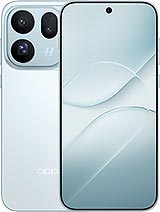
📱 Premium-quality screen for Oppo Find X10: enjoy using your phone again
Have you dropped your Oppo Find X10 and left the screen looking like a spider’s web? Don’t worry, it’s happened to most of us. Seeing the cracked glass on a phone released in 2026 is frustrating, but there’s a solution. At iLevante.com, you’ll find this Premium-quality screen for Oppo Find X10, designed to get your smartphone working normally again without spending as much as you would on a new phone.
This compatible replacement part matches the technical references CPH2911 and PMW110 and features a 6.59-inch panel. It can restore the display and touchscreen, so you can enjoy using your Find X10 again as if it were new. Before buying, check that your phone’s reference matches one of these two. That way, you can be sure you’re getting the right part 😉
🔎 Key details of the Oppo Find X10 screen
| Feature | Details |
|---|
| Compatible model | Oppo Find X10 |
| Brand | Oppo |
| Phone release year | 2026 |
| Screen size | 6.59 inches |
| Technical references | CPH2911 / PMW110 |
| Replacement part quality | Premium |
| Replacement part type | Complete screen (display + touchscreen) |
✨ Why choose a Premium screen for your Oppo X10?
When looking for a replacement screen for the Oppo X10, you’ll find all sorts of quality levels, prices and promises. Our Premium quality option aims to offer a good balance between price and performance. It’s a reliable replacement part with a clear display and a responsive touchscreen for everyday use: messaging, social media, videos or whatever you like.
- ✅ Good image quality for everyday use, with pleasing colours and sharp detail.
- ✅ Responsive touchscreen, making typing and browsing comfortable.
- ✅ Complete screen: the display and touchscreen glass are joined together, making installation easier.
- ✅ More affordable price than a repair through the official service centre.
- ✅ Checked before dispatch, so it arrives ready to install.
Best of all, you can replace it yourself or take it to a technician you trust. Many repair shops are happy for you to supply your own part, helping you save a good portion of the repair bill 💸
🛠️ When should you replace the Oppo Find X10 screen?
The glass doesn’t have to be shattered before you consider replacing the screen. Sometimes the Find X10 shows less obvious signs that something is wrong. Look out for these:
Common signs of a damaged screen
- 👆 Ghost touches: the phone opens apps or types by itself.
- 🚫 Unresponsive areas on the touchscreen, especially around the edges or in the corners.
- 🌈 Coloured lines, vertical or horizontal, that weren’t there before.
- ⚫ Black or purple spots that grow over time.
- 💧 Unusual marks after the phone gets wet, such as circles or shadows.
- 📴 Black screen even though the phone rings, vibrates or receives notifications.
- 🔆 Flickering or changes in brightness for no apparent reason.
If you notice any of these issues, the panel on your Oppo Find X10 is most likely damaged. Don’t leave it too long: cracked glass can let dust or moisture in, potentially affecting other components in your phone.
🔧 How to replace the Oppo Find X10 screen step by step
If you enjoy tinkering and have some experience with electronics, you can replace the screen at home. Take your time, though, as the Oppo X10 has delicate parts. Here’s a general guide to help you:
- Switch off your phone completely and remove the SIM tray.
- Discharge any static electricity, preferably by wearing an anti-static wrist strap. A static discharge can damage the connectors.
- Carefully heat the back cover with a hairdryer or a low-temperature heat gun to soften the adhesive. Don’t focus on one spot for too long.
- Using a suction cup and plastic picks, slowly open the back cover, working your way around the edges.
- Remove the screws from the protective plates and disconnect the battery before touching anything else. This is an essential step.
- Locate and disconnect the screen flex cable from the motherboard.
- Now heat the front of the phone and patiently separate the damaged screen from the frame without forcing it.
- Thoroughly clean any adhesive residue from the frame so the new screen fits properly.
- Fit the new screen, connect the flex cable and battery, then switch on the phone to test it before closing it up.
- If the display and touchscreen work properly, secure the screen and back cover with new adhesive and leave it to set for a few hours.
A friendly tip: 📸 take photos at each step as you take the phone apart. They’ll be really useful when it’s time to put everything back together.
Would you rather not do it yourself?
That’s fine. If you’re not confident, the best option is to take your Oppo Find X10 and this screen to a repair centre. A professional can replace it quickly, and you’ll only pay for the labour because you’re supplying the part. You’ll also avoid the risk of damaging a flex cable by rushing. You can also use Oppo’s official service, although it’s usually more expensive and you may have to wait longer to get your phone back.
📦 What to check before buying your Find X10 screen
To help everything go smoothly, quickly check the following:
- 🔢 Check your phone’s reference under Settings > About phone or on the box: it should be CPH2911 or PMW110.
- 📏 Confirm that your model is the 6.59-inch Oppo Find X10, not another model in the Find range.
- 🧰 If you’re installing it yourself, have precision tools ready: screwdrivers, picks, a suction cup and new adhesive. Check the product details to see exactly what’s included with your order.
- 💾 Back up your data if your phone is still responding, just in case.
- 🧪 Always test the screen before attaching it. It’s the best way to spot any problems in good time.
🚀 Oppo Find X10 screen with fast delivery from iLevante
We know that being without your phone is a pain: no WhatsApp, maps or photos... That’s why at iLevante.com we prepare orders promptly, so your screen for Oppo Find X10 gets to you as soon as possible. If you have any questions about compatibility with your Find X10 or your device’s reference, our team will be happy to help 🤝
Whether you’re comfortable picking up a screwdriver or would rather leave the job to a technician, this Premium screen for Oppo X10 is a practical, affordable way to get your 2026 smartphone working again. Your Oppo Find X10 still has plenty of life left in it 💪📱
• Product Weight: 0.20 kg.The technical specs of Oppo Find X10
can help you to choose the correct repair part for your device. Make sure your model reference is the same as this element. Here are some tech specs to help you:
- Brand: Oppo
- Oppo Find X10 Size: 156.5 x 74.3 x 8.4 mm.
- Release date: 2026, September 22.
- Weight: 216 g.
- Screen specs: LTPO AMOLED, 1B colors, 144Hz, 3840Hz PWM, Dolby Vision, HDR10+, HDR Vivid, BT.2020, 800 nits , 2000 nits , 3600 nits.
- Screen size: 6.59 inches, 106.7 cm2.
PVP:
SNK.LCDOPPOFX1082.95€ AvailableInStockNewCondition