Edge 50 Ultra screen: the panel that makes your Motorola special
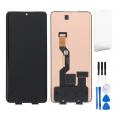
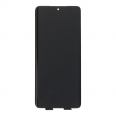
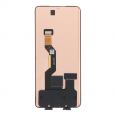
If you’ve made it this far, your Edge 50 Ultra has probably taken a knock, the touchscreen is acting up or a mark has appeared that won’t go away. What you’re looking at is a complete screen for Motorola Edge 50 Ultra in OEM quality. It’s the same type of curved panel, with the same brightness and responsiveness as the one your phone came with.
And while we’re at it, so you don’t have to start from scratch: it comes with a free screen protector and a free tool kit. That gives you almost everything you need for the replacement.
What does it mean for this Edge 50 Ultra screen to be OEM?
OEM stands for Original Equipment Manufacturer. These are parts made by the same suppliers and on the same production lines as the brand’s parts, but without its logo or packaging. That’s why they’re considerably cheaper than official replacement parts while offering the same quality. They’re nothing like generic copies.
At iLevante, we’re clear about this: with such a demanding panel (curved, 144 Hz and with an under-display fingerprint reader), opting for cheap copies can end up costing you more. With an OEM screen, you don’t lose any of the features that made you buy this phone.
Edge 50 Ultra screen specifications, straight to the point
Here are the figures, which are worth knowing for this model:
- Size and technology: 6.7-inch pOLED with curved sides.
- Resolution: 2712 x 1220 pixels (what Motorola calls 1.5K), around 446 ppi.
- Refresh rate: up to 144 Hz, with automatic, 60, 120 and 144 Hz modes.
- Touch sampling rate: 360 Hz, which makes a real difference when gaming.
- Colour: 10-bit (one billion colours), 100% DCI-P3, HDR10+ and Pantone colour validation.
- Peak brightness: 2,500 nits, just like the original.
- Glass: Corning Gorilla Glass Victus.
- Compatibility: Motorola Edge 50 Ultra (model XT2401 and its variants).
The brightness figure needs a little explanation. The 2,500-nit figure is a peak reached only in specific areas of HDR content. In everyday use, you’ll get around 500 nits with manual brightness, and in automatic mode it rises above 1,400 nits in bright sunlight. We’re telling you this so you don’t think your new screen is “less bright” when you test it indoors. That’s how the original panel works, and so does this one.
Another point of interest for people sensitive to flicker: the panel combines DC dimming with 720 Hz PWM, a fairly high frequency. There’s also a flicker-reduction mode in the settings that doesn’t affect the colours.
Installing the Edge 50 Ultra screen: what nobody tells you
Let’s be honest: this isn’t the easiest phone to open. Edge models are opened from the back, and the 50 Ultra’s rear cover is made of wood or vegan leather, depending on the version, so use heat and opening picks very carefully. The internal layers are held in place with plenty of adhesive, and there are delicate coaxial connectors. If you take your time and are patient, it can be done.
Key steps recommended by the iLevante team
- Discharge the battery to below 25% before opening the phone. If you accidentally puncture or bend the battery, the risk is much lower.
- Use moderate heat (around 70–80 °C) and work your way around the edges without rushing. Too much heat can leave marks on a wooden or vegan-leather back cover.
- Disconnect the battery first, then the other flex cables. Lift coaxial connectors from the rounded side, never the straight side, or you could pull the connector off the board.
- Test the screen before sticking anything down. Connect the flex cable, turn the phone on and check the image, touchscreen (including the curved edges) and brightness. Don’t remove the protective films or labels while testing.
- Once everything is working, close the phone using pre-cut adhesive. Liquid adhesives such as B-7000 can seep into the side-button gaps and then harden or cause the buttons to stick.
The tool kit we include has opening picks, precision screwdrivers and a suction cup—just what you need for these steps.
Common mistakes when replacing the Edge 50 Ultra screen
There’s one mistake we see time and again: bending the screen flex cable more than 90 degrees. It might seem fine at first, but you can end up with a black screen, green lines or coloured stripes. Always guide it gently, without forcing it or making sharp bends.
Another classic issue is the fingerprint reader. The Edge 50 Ultra has an optical fingerprint reader under the screen, so after replacing the screen you should delete your saved fingerprints and register them again. If it still doesn’t work, check for dust or adhesive residue between the panel and the sensor.
Are the side buttons stiff after installation? It’s almost always because excess adhesive has overflowed or the screen hasn’t seated properly in the frame. Thoroughly clean off the old adhesive before fitting the new screen and the problem should be solved.
Things to know about the curved screen
The Edge 50 Ultra is one of the few recent phones that still has curved edges, and that has its pros and cons. It looks beautiful, and Edge Light (the notification lighting along the sides) really stands out. But if you grip the phone tightly, your palm may touch the edge and trigger an occasional ghost touch. That’s part of the design; don’t mistake it for a fault with the replacement part.
Because of the curve, the edges are the most exposed part of the screen if you drop the phone. That’s where the included screen protector comes in: fit it from day one, as those edges are the first to break.
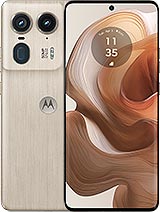
One extra tip from the iLevante team: before ordering the part, check in your phone’s settings that your model is an Edge 50 Ultra (XT2401). The Edge 50 family also includes the Pro, Fusion, Neo and standard models. Their screens may look similar, but they are not interchangeable. Even if the part is supplied without a frame, check the photos and details.
• Product Weight: 0.13 kg.The technical specs of Motorola Edge 50 Ultra
can help you to choose the correct repair part for your device. Make sure your model reference is the same as this element. Here are some tech specs to help you:
- Brand: Motorola
- Motorola Edge 50 Ultra Size: 161.1 x 72.4 x 8.6 mm.
- Release date: 2024, April 16.
- Weight: 197 g.
- Screen specs: P-OLED, 1B colors, 144Hz, HDR10+, 2500 nits.
- Screen size: 6.7 inches, 107.4 cm2.
PVP:
SNK.AS14703164.90€ AvailableInStockNewCondition