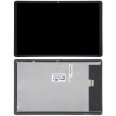
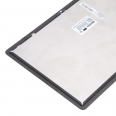
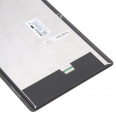
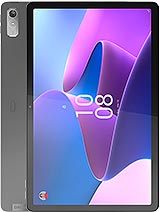
Lenovo Tab P11 2022 screen: the original replacement for TB350FU and TB350XU
Lenovo unveiled the Tab P11 Gen 2 at IFA in September 2022 and began selling it towards the end of that year. That’s why many people simply call it the Tab P11 2022, and the similar names can lead to the wrong part being ordered. This Lenovo Tab P11 screen is designed exclusively for the second generation: models TB350FU (Wi-Fi), TB350XU (LTE) and the general reference TB350. The first Tab P11 from 2020 (TB-J60• has an 11-inch 60 Hz panel, and its screen is not compatible. The P11 Plus, P11 Pro Gen 2 (11.2-inch OLED) and the later Tab Plus TB351FU are not compatible either, even though the latter also measures 11.5 inches.
The quickest way to check is to look at the label on the back or go to Settings > About tablet. If the model number starts with TB350, this is the right replacement.
What’s included with this complete Lenovo Tab P11 Gen 2 screen
This is a complete original-quality assembly: the LCD panel, touch digitiser and front glass are laminated together as one piece, with its connecting flex cable. There’s no need to separate the layers or glue the glass onto the panel, which is exactly what causes many DIY repairs to fail. In Lenovo replacement parts catalogues, this module is listed as the TB350 display unit with reference HQ3160EKGX000.
Your order also includes a screen protector and a tool kit for opening the tablet, so you don’t need to buy anything else to get started.
Panel specifications
- Diagonal: 11.5 inches, 5:3 (15:• aspect ratio.
- Resolution: 2000 × 1200 pixels (2K), around 203 ppi.
- Technology: IPS LCD with a refresh rate of up to 120 Hz, adjustable to 60 Hz.
- Brightness: 400 nits as specified by the manufacturer. Laboratory measurements of the original tablet recorded 423 cd/m² at the centre and an average of 396 cd/m², with 88% uniformity.
- Contrast: around 1,400:1 according to the specifications (measurements of 1,459:1 have been recorded).
- Touch: 10-point capacitive multitouch.
- Glass: Corning Gorilla Glass 3 with an anti-fingerprint coating.
- Certification: TÜV Rheinland Full Care Display, designed to help reduce eye strain.
As an original part, its brightness, colours and touch response match those of the tablet when it was new. One more practical detail: this panel has no PWM flickering at any brightness level. You’ll notice the difference if you do a lot of reading at night.
When to replace your Lenovo Tab P11 2022 screen
Cracked glass is easy to spot. Other problems can be harder to identify, so it’s worth ruling out the simple causes first. Before ordering a replacement, the iLevante team recommends removing the case (some cases press against the edges and cause ghost touches) and performing a full restart by holding down the power button. If the problem persists, these are typical signs of a damaged panel:
- Erratic touch response or dead areas, sometimes limited to a strip along the edge.
- Black or ink-like patches that spread over time; the LCD is damaged internally, even if the glass looks intact.
- Vertical or horizontal lines in a fixed colour, usually after a drop or strong pressure.
- Light leakage in the corners or distorted colours near the frame.
- A screen that stays black while the tablet continues to make sounds and vibrate.
At 7.4 mm thick and weighing 520 grams, the Tab P11 Gen 2 is a slim tablet, and that slim profile comes at a cost: a fall onto a corner can be enough to break the panel. The glass can also scratch easily if left unprotected. The included protector is there for precisely that reason.
How to install the Lenovo Tab P11 Gen 2 screen
The screen on this tablet is glued to the chassis with adhesive and opens from the front. The repair is moderately difficult to challenging: it can be done with patience, but it’s not a job to rush. Here’s the procedure followed by the iLevante technical team:
- Turn off the tablet and remove the microSD/SIM tray using the ejector tool.
- Heat the perimeter to around 70°C for 10–15 minutes using a heat gun or heating plate. A hairdryer will work, but it takes longer and heats less evenly.
- Use a suction cup and opening pick to create an initial gap, then run a card or thin plastic sheet around the edge to cut through the adhesive. Don’t insert the tool more than 2–3 mm: cables and the front camera sensor are underneath. On this model, the sensor is in the upper long edge of the frame.
- Lift the panel without forcing it, as if opening a book. If it resists, apply more heat.
- Disconnect the battery first, then disconnect the screen flex cable, which is usually under a small screwed-down metal plate (Phillips #000 screwdriver).
- Clean any adhesive residue from the frame with isopropyl alcohol.
- Connect the new screen, reconnect the battery and switch it on before gluing anything in place. Check the image, touch response in all corners, the brightness sensor and, if you use one, the stylus.
- Apply new adhesive tape around the perimeter, position the panel and press it down evenly for a few minutes. Ideally, leave it to set for a few hours with some weight on top.
Details that are easy to overlook
After replacing the screen, go to Settings > Display and check that the refresh rate is still set to 120 Hz; some tablets revert to 60 Hz after the battery is disconnected. If you use the Lenovo Precision Pen 2, do a quick writing test before fully closing the tablet.
One more tip: when the glass is badly shattered, it can be difficult to remove in one piece. Applying packing tape over the broken glass before heating it helps keep fragments from scattering and protects your fingers.
If you have any questions about your specific model, the iLevante team can help confirm compatibility before you open the tablet. It’s much easier to sort things out beforehand than when the screen is already detached.
• Product Weight: 0.40 kg.The technical specs of Lenovo Tab P11 (2nd Gen)
can help you to choose the correct repair part for your device. Make sure your model reference is the same as this element. Here are some tech specs to help you:
- Brand: Lenovo
- Lenovo Tab P11 (2nd Gen) Size: 269.1 x 169.4 x 7.4 mm.
- Release date: 2022, September 01.
- Weight: 520 g.
- Screen specs: IPS LCD, 120Hz, 400 nits.
- Screen size: 11.5 inches, 376.4 cm2.
PVP:
SNK.LCDLENOVOTABP1138.75€ AvailableInStockNewCondition