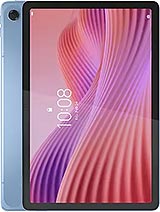
Premium Screen for Lenovo Tab 10.1 (2025)
Oh no! The screen of your Lenovo Tab has broken, and now you're left unable to enjoy your series, readings, or video calls like before. Don't worry, because at iLevante.com we have this available screen for Lenovo Tab of premium quality that perfectly fits the 2025 release model. With its 10.1 inches, this replacement part allows you to restore normal use of your tablet without complications and at a much more affordable price than going to an official service.
The technical references ZAEH0019IN, ZAEH0180IN, and ZAEJ0054IN correspond to this same premium screen for the Lenovo Tab 10.1. It's an ideal option if you're looking for something of good quality that works similarly to the original, without needing to pay high prices for exclusive brand components. Many Lenovo tablet users choose this replacement because it offers an excellent balance between performance and cost.
What makes this screen for Lenovo Tab special?
This screen for the Lenovo Tab 10.1 inches stands out for its premium construction, designed to offer a smooth and comfortable user experience. It comes complete with integrated touch glass, the LCD panel, and the necessary flex connectors for easier installation. It is not an original Lenovo part, but it is a high-quality alternative that many repairers and private users prefer for its reliability.
Some of the advantages you will notice when installing it are the good color reproduction and quite precise touch response in daily use. Ideal for those who use the Lenovo Tab 2025 for both work and leisure. Also, the packaging includes everything needed for you to make the change yourself if you feel up to it.
Signs that you need to change your Lenovo Tab screen
Sometimes, it's not necessary for the screen to be completely shattered to decide to renew it. Here are some common symptoms indicating that it's time to replace the screen of the Lenovo Tab 10.1:
- The touch doesn't respond well or behaves erratically in some areas.
- Black, blue spots or areas with brightness loss appear where they didn't exist before.
- After a hit or drop, lines or stripes start to appear affecting the display.
- The image looks blurry at the edges, or colors lose intensity over time.
- The brightness is no longer uniform, and darker areas or light leaks appear.
If you recognize any of these problems on your Lenovo Tab, this premium screen could be the most practical and economical solution.
Complete Kit to Repair Your Lenovo Tab
When you purchase this screen for Lenovo Tab, you receive much more than just the panel. The package includes all necessary components: the touch glass, the LCD module, the image controller, and the connecting flex cables. This way, you have everything on hand to carry out the repair without having to look for separate pieces.
As an extra detail, we also send you a basic tool kit that greatly facilitates the job. Inside you'll find screwdrivers, plastic picks, levers, and a suction cup. With these items, you can open the device more carefully and avoid damaging other internal components of the Lenovo Tab 10.1 2025.
Steps to change the Lenovo Tab 10.1 screen
If you decide to make the change yourself, here is a simple and orderly guide. Remember to work in a clean space with good lighting. Take your time, as patience is key in these types of repairs.
- Completely turn off your Lenovo Tab and disconnect any charger or accessory.
- Discharge static electricity by touching a metal surface before manipulating internal components.
- Apply gentle heat with a hair dryer or heat gun around the edges of the current screen. Maintain a safe distance and do not overheat any point for more than two seconds.
- Insert the kit's picks along the sides and carefully slide them to release the adhesive. Do this around the entire perimeter of the Lenovo Tab 10.1.
- Place the suction cup in the center and gently pull upward to lift the old screen. Be careful not to break the flex.
- Carefully disconnect the flex cables from the motherboard. You can use the kit's levers.
- Clean adhesive residues from the casing with a soft cloth and isopropyl alcohol if necessary.
- Connect the flex of the new premium screen into their corresponding connectors. Make sure they are well fitted.
- Turn on the tablet to check that the image and touch functions work correctly before gluing.
- Once everything is verified, place the new screen and gently press the edges so that the adhesive takes effect. Let it rest for a few hours to ensure it is properly adhered.
These steps are intended for anyone with a bit of skill to perform the repair at home. If you prefer not to take risks, you can always take the screen to a trusted technician who accepts third-party replacements.
Compatibility and Technical References
This premium screen is specifically designed for the Lenovo Tab model with 10.1 inches launched in 2025. The references ZAEH0019IN, ZAEH0180IN, and ZAEJ0054IN will help confirm that you are acquiring the correct replacement part. If your tablet matches any of these references, you can rest assured that the part will fit without adjustment issues.
Remember that there are different ways to refer to your device: Lenovo Tab, Tab Lenovo 10.1, or simply Lenovo tablet 2025. They all point to the same equipment, and this screen is compatible with them.
Premium Quality vs. Other Options
The premium quality we offer is one of the most demanded by those looking for a good balance between price and performance. Although it does not incorporate exclusive Lenovo technologies, it provides a very similar experience in daily use. Users particularly value the image clarity and touch fluidity once installed.
If you compare it with other cheaper screens on the market, you'll notice that this premium version often offers better brightness uniformity and more consistent touch response. It is a smart choice if you want to extend the useful life of your Lenovo Tab without spending a fortune.
Tips to Keep Your New Screen in Good Condition
Once the screen is installed on your Lenovo Tab 10.1, some small precautions can help it last longer. Avoid direct impacts and always use a protective case when carrying it in the backpack or bag. Cleaning the surface with a soft microfiber cloth also helps maintain optimal visibility.
Additionally, it is advisable not to expose the tablet to extreme temperatures or leave it charging for many hours without supervision. These simple habits help ensure that both the new screen and the other components work correctly for a longer time.
• Product Weight: 0.20 kg.The technical specs of Lenovo Tab (2025)
can help you to choose the correct repair part for your device. Make sure your model reference is the same as this element. Here are some tech specs to help you:
- Brand: Lenovo
- Lenovo Tab (2025) Size: 235.7 x 154.5 x 7.5 mm.
- Release date: 2025, August 14.
- Weight: 425 g.
- Screen specs: IPS LCD, 400 nits.
- Screen size: 10.1 inches, 295.8 cm2.
PVP:
SNK.RPS033381.95€ AvailableInStockNewCondition