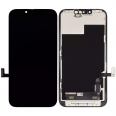
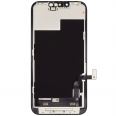
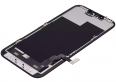
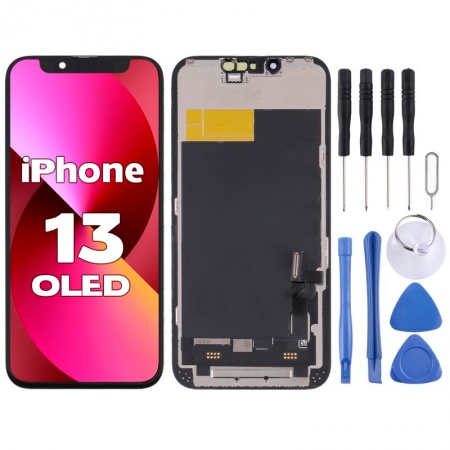
📱 iPhone 13 OLED Screen – The Ultimate Image Quality for Your Repair
If you're looking to restore your iPhone 13 to the exact visual experience it had fresh out of the box, this is your screen. We're talking about a high-end OLED panel, manufactured with the same base technology as the original Apple: absolute blacks, infinite contrast, vibrant colors, and a tactile smoothness that is noticeable from the first swipe.
This is not just any compatible screen. It's the option for those who don't want to notice any difference with the original Super Retina XDR panel, whether it's because you watch a lot of photos and videos, play games regularly, or simply because after paying for an iPhone 13, it doesn't seem reasonable that the repair turns it into a "second-hand" phone.
🌟 What Sets a Real OLED Apart from any LCD Alternative
Before diving into specifications, it's important to understand why Apple chose OLED for the iPhone 13 and why we recommend this screen to those wanting full fidelity:
In an OLED panel, each pixel emits its own light. When something on the screen is black, those pixels simply turn off. There is no backlight behind illuminating a liquid crystal as occurs in an LCD: there's a total absence of light. The result is what is known as perfect black, with a measurable contrast ratio exceeding 1,000,000:1, compared to the typical 1500:1 of a good LCD. This translates to images with depth and drama that an LCD, no matter how good, cannot match.
Furthermore, because there is no constant backlighting, the OLED consumes less energy in dark interfaces (iOS dark mode, watching videos with black bars, night navigation), restoring the original autonomy of the iPhone 13 that a compatible LCD tends to slightly reduce.
⚙️ Technical Specifications of the Panel
| 📐 Feature | 📊 Specification |
| Panel Technology | OLED |
| Native Resolution | 2532 × 1170 px (460 ppi) |
| Size | 6.1 inches diagonally |
| Typical Brightness | ~800 nits in normal use |
| Peak Brightness (HDR) | Up to 1200 nits in compatible content |
| Contrast Ratio | 2,000,000:1 (absolute blacks) |
| Color Coverage | ~100% DCI-P3 (cinematic range) |
| Color Depth | 10-bit true (1.073 billion colors) |
| Maximum Refresh Rate | Capable of up to 120 Hz (limited to 60 Hz by the standard iPhone 13 SoC) |
| Touch Sampling Rate | 240 Hz (high sensitivity digitizer) |
| HDR Compatibility | HDR10, Dolby Vision (same as original) |
ℹ️ Important Note on the 120 Hz: the panel is manufactured with support for refresh rates of up to 120 Hz, but the standard iPhone 13 A15 Bionic chip only outputs at 60 Hz (the 120 Hz ProMotion technology was reserved by Apple for Pro models). This is not a limitation of the screen but the device itself. What you will notice is the smoother touch thanks to the 240 Hz digitizer, especially when typing quickly and in games.
📦 Replacement Content
- 🌑 OLED Panel
- 👆 High sensitivity digitizer with 240 Hz sampling
- 🔌 Original flex with 1:1 connectors to iPhone 13 motherboard
- 🧰 Driver IC chip with iOS 17/18 compatible firmware
- 🦾 Reinforced metal frame with pre-applied adhesive
- 🚚 Earpiece dust mesh already integrated
- 🎁 Professional tool kit included (Pentalobe P2, Phillips, picks, suction cup, tweezers)
🎯 Who is this Screen for?
Not everyone needs a high-end OLED. We help you determine if this is the right screen for you:
| Profile | Is this screen for you? |
| You consume a lot of multimedia content (Netflix, YouTube, photos) | ✅ Yes. You will notice the pure blacks and HDR contrast. |
| You often play games on the iPhone | ✅ Yes. The 240 Hz digitizer makes a difference. |
| You want to maintain the original autonomy of the iPhone 13 | ✅ Yes. The consumption is almost identical to the factory panel. |
| You are going to sell the iPhone soon | ✅ Yes. The original panel was OLED; keeping it preserves the value. |
| You are a photographer or work with color | ✅ Yes. 100% DCI-P3 coverage is essential. |
| You only use the phone for calls, WhatsApp, and little more | ⚠️ Maybe it's more than you need. A quality LCD will suffice for less money. |
| You're looking for the cheapest possible repair | ⚠️ Consider our compatible LCD option. |
🔍 What You Gain Over a Compatible LCD (Practical Examples)
Specifications sound good on paper, but how does that translate day-to-day? Here are concrete examples where you will notice the difference from day one:
- Watching a movie on Netflix with black bars: on OLED the bars literally disappear, merging with the phone's bezel. On LCD they appear as two gray-lit stripes.
- Using iOS dark mode: the background is true black, which reduces nocturnal visual fatigue and saves battery. On LCD that same "black" is still backlit dark gray.
- Looking at photos in the roll: sunsets, portrait shadows, or details in dark areas are seen with realism that LCD flattens.
- Playing games with dark scenes (Genshin Impact, Resident Evil, Alien Isolation): details in shadows are noticeable that in LCD remain smudged in gray.
- In the equivalent Always-On screen and night notifications: the clock and information float over absolute black without backlit halos.
🔄 Compatible with IC Transplant to Remove iOS Warning
Like all our premium screens, this OLED is ready for a technician to transplant the original IC chip from your broken screen. After this micro-soldering operation, iOS will recognize it as an original screen, and you will not see any message in Settings or on lock.
It's completely optional: the screen works perfectly without transplant (touch, automatic brightness, Face ID, True Tone with programmer, autonomy... everything remains the same). The transplant only removes the software cosmetic warning, it does not provide additional performance. It's particularly recommended if you are going to resell the device or if you're a workshop wanting to deliver the phone without the final customer receiving any notification from Apple.
💡 Technical Details Nobody Tells You
Some OLED peculiarities are worth knowing before buying to avoid surprises or misunderstandings:
- Pulse Width Modulation (PWM): OLEDs, including Apple's original, regulate brightness by turning pixels on and off at high frequency. Some sensitive individuals may perceive flicker at low brightness. This screen uses PWM at high frequency to minimize it, just like the Apple panel.
- Burn-in: it is the main historic downside of OLED. It occurs when static elements (status bar, keyboard) remain on screen for a long time at high brightness. With normal use and iOS's automatic lock times, it's virtually impossible to appear in years of use.
- Factory calibration: each panel is individually calibrated for Delta E < 2 (color difference imperceptible to the human eye). This is what separates a good OLED from a mediocre one.
💸 Smart Investment, Not an Expense
The price of this OLED screen is 36.75€ (VAT included). Yes, it's above our compatible LCD option, but the right question isn't "how much does it cost?" but "how much is it worth keeping your iPhone 13 just the way it was?".
An official repair at Apple exceeds €329. An iPhone 13 with a low-quality LCD screen loses resale value considerably. This OLED screen places you exactly at the optimal point: identical experience to the original, 50% savings compared to SAT and preservation of the device's value.
🚨 How to Care for an OLED to Last for Years
OLED requires slightly different care than LCD. Here are the key points:
- ✔️ Activate auto lock at 30 seconds or 1 minute: prevents static elements from staying on the screen for too long, the main cause of burn-in.
- ✔️ Use iOS dark mode: reduces the wear of blue pixels (those that age fastest in OLED) and extends the panel's lifespan.
- ✔️ Do not keep maximum brightness constantly: automatic brightness is your ally, let iOS manage it.
- ✔️ 0.3 mm tempered glass protector: since it's OLED, the panel is slightly more sensitive to point pressures. A thin tempered glass protects it without interfering with touch sensitivity.
- ✔️ Case with raised edges: essential. A face-down fall on an uneven surface can damage the flexible panel even if the glass withstands it.
- ✔️ Avoid prolonged exposure to extreme heat: OLED degrades faster above 35-40°C ambient temperature. Do not leave it in the car dashboard's sun in summer.
- ✔️ Avoid using very bright static wallpapers for months: alternate backgrounds or use iOS dynamic ones to distribute wear.
❓ Frequently Asked Questions about the iPhone 13 OLED Screen
Is this OLED screen exactly the same as Apple's original?
It's practically indistinguishable in real use. It shares the same base technology, identical native resolution, very similar brightness, and full DCI-P3 color space coverage. The most measurable technical difference is that Apple uses panels manufactured by Samsung Display or LG Display with a specific binning for iPhone, while compatible OLEDs use panels from the same factories but with slightly lower binning. In practice, unless measuring with a professional colorimeter, you won't notice a difference.
If the standard iPhone 13 is at 60 Hz, what is the use of having a panel up to 120 Hz?
It's a good question and it's worth clarifying. The panel is manufactured with technical capability for 120 Hz, but the standard iPhone 13 (unlike the 13 Pro and 13 Pro Max) has a graphics controller that only sends a signal at 60 Hz, so you will see the image at 60 Hz regardless of the panel you install. The real advantage you will definitely notice is the 240 Hz touch digitizer, which detects your touches with lower latency: more immediate response when typing, better accuracy in games, and more natural scrolling. If you wanted real 120 Hz, the device would have to be an iPhone 13 Pro or higher.
Is it worth paying more for OLED over LCD?
Depends on your usage. If you spend more than an hour a day watching video, photos, or gaming, yes, clearly. If you use the phone mostly for messaging, calls, and navigation, a quality LCD will do perfectly and you will save money. The most evident difference will be in dark scenes and night mode: there no LCD comes close to an OLED.
How long does a replacement OLED panel last before degrading?
Current OLEDs (including this one) have an estimated lifespan of 30,000-50,000 hours before losing 50% brightness, which equates to more than 8-10 years of intensive use (8 hours daily). In practice, the iPhone will become obsolete by software long before the screen deteriorates.
Does it suffer from burn-in like old OLED TVs?
The risk exists theoretically, but it is very low in real use with a phone. Old OLED TVs showed burn-in from static channel logos maintained for thousands of hours at maximum brightness. On an iPhone, with auto-lock activated and varied app use, burn-in is practically non-existent. Apple has been using OLED since the iPhone X (2017), and reported burn-in cases are anecdotal.
Do True Tone, automatic brightness, and Face ID work with this screen?
Automatic brightness and Face ID: yes, without changing anything. True Tone is lost by default when changing the screen, but a technician with a programmer (JC, QianLi Clone, etc.) can transfer the calibration data from your original screen and recover it. If the IC chip transplant is also performed, the screen will be indistinguishable from an original for iOS by all effects.
Is it more fragile than an LCD against drops?
Yes, slightly. The OLED substrate is flexible polyimide, which gives it better image quality but less resistance to strong point pressures. The external glass is as resistant as any other screen, so there is no difference in normal drops. The extra precaution is not to press the notch area or corners with force, and always use a case.
Why are some compatible OLEDs so cheap, and this is not?
Because they are not the same. You can find OLEDs from €30 that are actually low-end Hard OLED with poor calibration, 500-600 nits brightness, sRGB coverage instead of DCI-P3, and slow digitizers. Visually, they are better than an LCD but fall clearly below the original. Ours is OLED with Delta E calibration < 2, 800 nits brightness, and 240 Hz digitizer: a different league.
What if I install it and see a green dot, lines, or dead pixels?
All our panels pass individual QC before leaving the warehouse, so it's very unlikely. If you still receive a factory-defective unit, contact our support immediately, and we will handle it under warranty. Important: damages caused by incorrect installation (bent flex, excessive pressure, ESD by not using an anti-static wristband during change) are not covered. Remember not to remove the warranty seals that come with the screen or install it before testing.
At iLevante, after more than 20 years distributing mobile spare parts, we know there isn't a single "good" screen for all customers. This OLED is for those seeking the utmost fidelity to the original and understand that in a screen, as in almost everything, quality is felt every time you turn on the device. 🌑✨
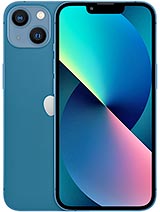
• Product Weight: 0.14 kg.The technical specs of Apple iPhone 13
can help you to choose the correct repair part for your device. Make sure your model reference is the same as this element. Here are some tech specs to help you:
- Brand: Apple
- Apple iPhone 13 Size: 146.7 x 71.5 x 7.7 mm.
- Release date: 2021, September 14.
- Weight: 174 g.
- Screen specs: Super Retina XDR OLED, HDR10, Dolby Vision, 800 nits , 1200 nits.
- Screen size: 6.1 inches, 90.2 cm2.
PVP:
SNK.IP13000136.75€ AvailableInStockNewCondition