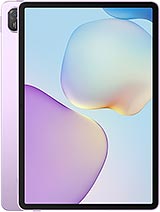
Huawei MatePad 11.5 (202<span class="ColorBull">•</span> TXZ-W10 Premium ScreenPremium Quality Screen for Huawei MatePad 11.5 (202• Now Available!
Has the screen of your Huawei MatePad 11.5 (2026) broken and you don't know what to do? Don't worry, at iLevante.com we have the perfect solution with our Huawei MatePad 11.5 TXZ-W10 Premium Screen. This replacement is specially designed for the MatePad 11.5 launched in 2026, and it features a size of 11.5 inches, fitting perfectly into your tablet. Forget about not being able to enjoy your series, documents, or drawings on the Huawei MatePad 11.5.
The technical reference TXZ-W10 identifies this Premium quality screen as a reliable and high-performance option for your Huawei MatePad 11.5 (2026). Many users look for compatible replacements for the MatePad 11.5 and this is one of the most demanded due to its balance between price and features. If your tablet shows cracks, unresponsive areas, or strange colors, this screen may be exactly what you need.
Why Choose the TXZ-W10 Screen for Your Huawei MatePad 11.5?
When looking for a screen for Huawei MatePad 11.5 (2026), you want something that feels similar to the original without complications. Our Premium version offers a smooth experience and vibrant colors that make using your MatePad 11.5 a pleasure again. It is made with top-quality materials that withstand daily use and fits well with the sleek design of the Huawei MatePad 11.5.
Additionally, it comes ready to install with all necessary components: the main panel, integrated touch glass, and connection flex cable. You won't have to look for loose pieces. This makes it a practical option for those who want to repair their MatePad 11.5 TXZ-W10 without relying solely on official services.
Signs Your MatePad 11.5 Needs a New Screen
Sometimes it is not so obvious that the screen of the Huawei MatePad 11.5 (2026) is failing. Here are some common clues that indicate it's time to replace it:
- The touchscreen responds late or does not detect your fingers in some areas at all.
- Black, blue stains, or lines appear that weren't there before.
- After a hit or drop, you see a web of cracks affecting visibility.
- You notice light leaks at the edges or uneven brightness.
- Colors appear muted or with strange hues at the corners.
If you can identify with any of these situations on your Huawei MatePad 11.5, the TXZ-W10 Premium screen can help you restore normal functionality quickly.
Buying the screen for MatePad 11.5 (2026) from iLevante.com has an extra advantage: we send you a basic tool kit at no additional cost. Inside you'll find screwdrivers, plastic picks, levers, and a suction cup. Everything needed to open your Huawei MatePad 11.5 carefully and without scratching the case.
How to Replace the Huawei MatePad 11.5 Screen Step by Step
Are you up for doing it yourself? Here is a simple and detailed guide to installing the new screen in your MatePad 11.5 TXZ-W10. Take your time and follow each step patiently.
- Shut down your Huawei MatePad 11.5 (2026) completely and ensure it has no residual battery.
- Discharge static electricity by touching a metal surface or using an anti-static wrist strap if available.
- Gently apply heat with a hairdryer or heat gun around the edges of the current screen. Maintain a distance of about 5 centimeters and do not stay in the same place for too long to avoid damaging internal components.
- Insert the picks from the kit along the sides and move them carefully up and down until the adhesive is fully released.
- Use the suction cup to gently lift the old screen once the edges are freed.
- Disconnect the flex cable very carefully, preferably using the plastic lever to avoid damaging the connector.
- Clean the remaining old adhesive from the MatePad 11.5 case before placing the new screen.
- Connect the flex cable of the TXZ-W10 Premium screen to the motherboard.
- Turn on the tablet to check that everything works: touchscreen, colors, and brightness.
- Once verified, attach the new screen by evenly pressing along the edges and let the adhesive set for several hours.
Practical Tips Before Starting the Repair
Working with the Huawei MatePad 11.5 screen requires some delicacy. If you have never replaced a screen before, look for a specific video tutorial for the TXZ-W10 model. Work on a clean and well-lit surface. Keep quality double-sided adhesive tape on hand in case you need to reinforce any point.
Remember that the Premium screen we offer is designed to offer an experience very similar to the original on your Huawei MatePad 11.5 (2026). Its thickness and touch response are adjusted to make daily use comfortable and smooth.
Differences Between Screen Qualities for the MatePad 11.5
Several options exist in the market for the Huawei MatePad 11.5. The Premium quality we sell stands out for its balance between sharpness and energy consumption. It is a popular choice among those who want something better than the more basic versions but without reaching the prices of official components.
| Feature | Premium Quality TXZ-W10 | Other Basic Qualities |
| Touch Response | High and precise | Variable |
| Brightness and Colors | Good levels | More limited |
| Ease of Installation | Complete components | Sometimes pieces are missing |
Frequently Asked Questions About Huawei MatePad 11.5 Screen
Is it compatible with all Huawei MatePad 11.5 from 2026? Yes, this TXZ-W10 screen is designed exactly for that model. Do I need advanced knowledge? With the tool kit and following the steps, it is totally feasible for users with some skill. What if it gets complicated? You can always take it to a trusted technician and provide your own replacement.
The screen for Huawei MatePad 11.5 (2026) of Premium quality is a smart way to extend the life of your tablet without spending a fortune. With the TXZ-W10 model, you will have your MatePad 11.5 as good as new in no time. Explore all the possibilities this replacement offers and regain control of your favorite device!
• Product Weight: 0.20 kg.The technical specs of Huawei MatePad 11.5 (2026)
can help you to choose the correct repair part for your device. Make sure your model reference is the same as this element. Here are some tech specs to help you:
- Brand: Huawei
- Huawei MatePad 11.5 (2026) Size: 262.6 x 177.5 x 6.1 mm.
- Release date: 2025, December 22.
- Weight: 515 g.
- Screen specs: TFT LCD, 120Hz, 600 nits.
- Screen size: 11.5 inches, 390.2 cm2.
PVP:
SNK.LCDHM1152026103.93€ AvailableInStockNewCondition