
Complete screen for Honor Magic4 Lite
OUT OF STOCK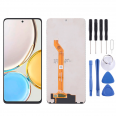
No disponible.
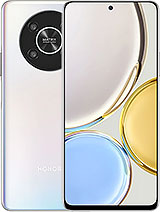
- Includes free tool kit
For Honor Magic 4 Lite
- Honor Magic4 Lite Screen 2022
- Quick Honor Magic 4 Lite Screen Replacement
- What is the price of the Honor Magic 4 Lite Screen?
- What color or colors are available?
- Do I need to go to an official Honor service center?
- Can I replace the Honor Magic4 Lite screen myself?
- Original options and advice from Honor Magic 4 Lite
- How to diagnose if the screen is broken
Honor Magic4 Lite Screen 2022
If your Honor Magic 4 Lite screen has cracked, we offer you the most economical and effective solution to carry out the replacement with your own skills.The display we provide has all the features we will teach you now:
- The IC that controls what is displayed.
- The LCD screen, where we see the images as they move.
- The flex that connects to the Honor brand module.
- The touch, which sends the signal of the touches we make with our hands on the smartphone.
The Honor Magic4 Lite Screen and tools will arrive in perfect condition thanks to the type of box we use, ensuring that nothing we send you will be damaged.
Quick Honor Magic 4 Lite Screen Replacement
In this article, I will explain in a simple, easy, and safe way, how to replace the unusable screen of the Magic 4 Lite in just four steps. But first, to start, make sure you know the features of your phone.To begin, place the device face down. You must open the back cover, the battery, and you will see some screws, remove them.
Also, as a second step, disconnect the Flex that connects the touch to the motherboard now that the cable can be affected. To identify it, you will see that it is a small socket. With the plastic lever, apply a little pressure and it will pop out by itself.
Third, you must remove what is broken, for this we will use two tools:
- Heat: for this you can use a hair dryer, not exceeding 120°C. Apply it all around
- A plastic pick: press between the screen and the casing.
- Finally, place the screen (previously remove any remaining adhesive) and connect the Flex in the same way as it was. Now all that remains is to place the screws and the cover.
What is the price of the Honor Magic 4 Lite Screen?
The price is the one stated at the top (38.25€). In addition, this price comes with a special promotion, so take advantage of this offer that ends soon. Another point to note is that the total price includes VAT, so you don't have to pay extra.What color or colors are available?
There are only black displays from the factory because the screen covers the entire front cover of the smartphone and does not have any type of frame, regardless of the color of your phone.Do I need to go to an official Honor service center?
We understand what you felt in that situation when the screen was damaged. We feel this moment so much because we know that going to a repairer will not be cheap and it is not worth such an expense. But stay calm, we offer you the ease of repairing it at home and without wasting your money.Can I replace the Honor Magic4 Lite screen myself?
Our goal is focused on your happiness and being able to provide you with a solution to everyday problems. Next, I will reveal how you can tell if your screen has suffered a blow and if you need to replace it, and if so, we have already listed how to dismantle it easily (with a surprise). Without further ado, focus on each of the steps and... get to work!Original options and advice from Honor Magic 4 Lite
Now that you have your new screen installed, you undoubtedly want to protect it so the same thing doesn't happen again.There are various cases to safeguard your phone, the best and most used are the high-impact cases that protect the lower and upper parts of your smartphone.
Next are the tempered glass protectors that are installed with an adhesive they come with, they are super easy to install. They also withstand many fractures, have the virtue of cracking frequently, but the new smartphone screen will not be damaged. A very interesting invention we found is the high-impact liquid, this liquid has a higher resistance to falls and cracks much less than high-impact glass.
In addition, you can find very useful accessories. One of these was designed to be installed in phone cases and allows you to hold it with a strap over our hand.
How to diagnose if the screen is broken
Before concluding that it has stopped working completely, we must analyze whether it is the glass or the display that is damaged.- First, when turning on your phone, try to use it by touching the screen. If it works, it is probably because there are still parts of your phone that have not been damaged in the severe blow.
- Second, look closely at the edges of your phone. The edges are the first place where the injuries from the recent blow are found, over time these cracks will spread across the entire screen, making it impossible to see the data on the phone. That is when you should remove the screen.
- Third, it is possible that your phone shows almost no damage due to the fall, but if the touch does not work or only works in certain parts of the smartphone, you must have a correct display for your Magic 4 Lite model.
The technical specs of Honor Magic 4 Lite
can help you to choose the correct repair part for your device. Make sure your model reference is the same as this element. Here are some tech specs to help you:- Brand: Honor
- Honor Magic 4 Lite Size: 166 x 75.8 x 8 mm.
- Release date: 2022, March 23.
- Weight: 189 g.
- Screen specs: IPS LCD, 120Hz.
- Screen size: 6.81 inches, 112.3 cm2.





