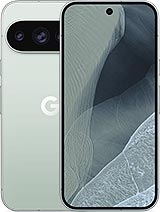
Google Pixel 11 Pro 6.3" Screen Premium Quality
Has your Google Pixel 11 Pro fallen and now the screen looks like a shattered glass from a dramatic movie? Don't worry, you're not the only one.With this 6.3-inch screen for Google Pixel 11 Pro of Premium quality, you can bring your mobile back to life without having to change your phone or break the bank.
This replacement is specifically designed for the Pixel 11 Pro (model 2026), with technical reference GM45K and G7SWN, so you know you're buying a screen compatible with your device and not "something similar".
| Feature | Detail |
| Compatible model | Google Pixel 11 Pro (year 2026) |
| Screen size | 6.3 inches |
| Type of replacement | Complete screen (display + touch assembled) |
| Quality | Premium |
| Technical references | GM45K, G7SWN |
| Brand | Compatible with Google |
Screen for Google Pixel 11 Pro 6.3": what does this replacement include?
This complete screen for Pixel 11 Pro is ready to install, ideal if you want to do the replacement yourself or take it to a trusted technician.It includes the necessary components to restore your phone's front:
- Screen panel already assembled.
- Integrated touch glass with good touch response.
- Flex connectors ready to attach to the Pixel 11 Pro's board.
- Front structure of the screen (depending on the batch and version of the replacement).
Since the set comes pre-assembled, you don't need to separate the glass and display, which significantly reduces the risk of breaking anything during the process.Less hassle, more chances of getting your repair right the first time.
When do you need to change the screen of the Google Pixel 11 Pro?
Your Pixel 11 Pro screen doesn't need to be shattered for it to be a good idea to replace it.There are several clear signs that this replacement will be a lifesaver:
- Visible cracks or breaks in the glass, even if the image is still visible.
- Color spots, black areas or "clouds" that weren't there before.
- Vertical or horizontal lines crossing the screen.
- Ghost touches: the phone registers touches by itself or the touch screen fails in specific areas.
- Lack of response in part or all of the touch surface.
- Light leaks at the edges or corners of the panel.
- After a hard drop or impact, the screen is very dim or completely black.
If you identify with any of these points, this replacement screen for Google Pixel 11 Pro is exactly what you need to use your mobile normally again.
Google Pixel 11 Pro Premium Quality Screen: what to expect
The Premium quality is designed for those who want a good user experience on their Pixel 11 Pro without going for the most basic replacement.With this type of screen, you'll have:
- Good image definition for daily use: social media, videos, apps, etc.
- Smooth touch response, ideal for typing, gaming, or browsing without frustration.
- Balanced colors and adequate brightness for regular phone use.
- A replacement designed for continuous use and compatible with the Google Pixel 11 Pro 2026.
It's a very interesting option if you want to repair your Pixel 11 Pro without spending on a new one, but you also don't want to risk it with very basic qualities.
Screen compatibility with the Google Pixel 11 Pro (model 2026)
This replacement is designed for the Google Pixel 11 Pro launched in 2026.If you have doubts about whether your phone is really this model, you can check:
- The device information in the system settings.
- The original phone box, where the name Pixel 11 Pro usually appears.
- The approximate purchase date: this model corresponds to the 2026 generation.
The references GM45K and G7SWN serve as an additional technical guide to confirm that the screen you see on iLevante.com is suitable for your device.
Advantages of changing the Pixel 11 Pro screen yourself
If you like tinkering with technology or simply want to save some money, changing the Google Pixel 11 Pro screen on your own can be a good idea:
- Saving: you only pay for the replacement, not the labor.
- Speed: you don't depend on a service center's schedule.
- Total control: you choose the quality of the screen you install on your Pixel 11 Pro.
- Experience: if it goes well, you'll gain skills for future repairs.
However, if you don't feel patient or steady-handed, you can always buy the screen at iLevante.com and take it to a trusted technician.Many services accept that you bring your own replacement, and you ensure which part is being installed on your Pixel 11 Pro.
How to change the Google Pixel 11 Pro screen step by step
If you've decided to embark on the adventure of changing the Pixel 11 Pro screen yourself, here's a simple guide to help you.Keep in mind that each technician may follow their own method, but these steps serve as a general basis.
1. Preparing the work area
- Completely turn off your Google Pixel 11 Pro.
- Work on a clean, flat, and well-lit surface.
- If possible, use a anti-static wrist strap to avoid discharges on the board.
- Have fine tools at hand: precision screwdrivers, picks, plastic lever, and a suction cup.
2. Opening the Pixel 11 Pro
- Remove the SIM tray.
- Unscrew the lower screws (near the charging connector), if they are visible.
- Apply gentle heat around the screen edges with a hairdryer or low-power heat gun, maintaining some distance.
- Using a suction cup, gently lift a corner of the screen.
- Insert a plastic pick into the gap and peel off the adhesive with gentle movements around the entire perimeter.
Important: avoid using metal tools directly on the case or near the board to avoid marking or damaging components.
3. Disconnecting the old screen
- Once the screen is lifted, open it carefully as if it were a book without pulling on the cables.
- Locate the flex connectors of the screen on the motherboard.
- Remove any covers or protection plates, if present, by loosening their screws.
- Carefully disconnect the flex using a plastic tool.
- Completely remove the damaged screen and set it aside.
4. Preparing for the new screen
- Gently clean off the adhesive residues from the frame of the Pixel 11 Pro.
- Check if you need to transfer any parts from the old screen to the new one (e.g., earpiece grille or small rubbers), depending on the replacement design.
- Apply new adhesive or specific adhesive strips for the screen, if available.
5. Connecting and testing the new screen
- Connect the new screen flexes for Google Pixel 11 Pro to their respective connectors.
- Replace any plates or protections you have removed.
- Before closing, turn on the phone and check:
- That the image displays correctly.
- That the touch screen responds in all areas.
- That there are no flickers or strange spots.
If everything works fine, turn off the device again for the final closure.
6. Closing the Google Pixel 11 Pro
- Position the screen in its correct position, first seating one part and then gently pressing around.
- Ensure that the adhesive makes good contact throughout the perimeter.
- Screw back the lower screws if they were present.
- Insert the SIM tray.
Tip: after closing the phone, avoid bending it or applying strong pressure for a few hours so the adhesive sets properly.
Tips for caring for your new Pixel 11 Pro screen
Now that you have a new screen in your Google Pixel 11 Pro, it's worth taking good care of it:
- Use a screen protector from day one.
- Combine it with a case that protects the corners well.
- Avoid carrying the phone loose with keys or coins in the same pocket.
- Do not charge it in places where it could easily fall (table edges, sofas, etc.).
With this 6.3" screen for Google Pixel 11 Pro of Premium quality, your phone will be usable, presentable, and ready to keep up with the daily grind.All you have to do is decide whether to perform the repair yourself or entrust it to a technician… but the first step is already taken: the right replacement for your Pixel 11 Pro 2026.
• Product Weight: 0.20 kg.The technical specs of Google Pixel 11 Pro
can help you to choose the correct repair part for your device. Make sure your model reference is the same as this element. Here are some tech specs to help you:
- Brand: Google
- Google Pixel 11 Pro Size: 152.7 x 71.9 x 8.4 mm.
- Release date: 2026, August 12.
- Weight: 204 g.
- Screen specs: LTPO OLED, 120Hz, HDR10+, 2400 nits , 3600 nits.
- Screen size: 6.3 inches, 95.6 cm2.
PVP:
SNK.GOOGLEP11P159.01€ AvailableInStockNewCondition