
What are the dimensions and specifications of the Realme Note 50.
Publicado por Maria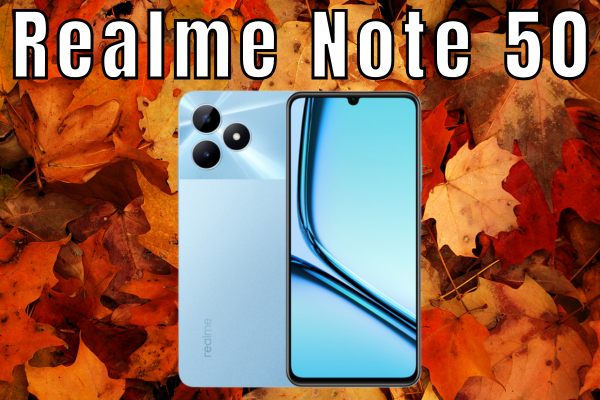
What are the dimensions and specifications of the Realme Note 50 ?
Do you have a Realme Note 50 in your hands and feel like something is not right? Or perhaps you are one of those cautious individuals who wants to ensure the replacement part will fit like a glove before purchasing it? Whatever your situation, you've landed in the right place. In the world of mobile repair, the details matter?a lot. A millimeter more or less can be the difference between a successful repair and a massive headache.
The Realme Note 50 has entered the market strongly in the entry-level range. It?s that typical "workhorse" phone that many users choose for its excellent price-performance ratio. But, like any electronic device we use daily (and sometimes mistreat a little?admit it ?), it is exposed to falls, battery wear, and connector failures. At iLevante.com, we know that understanding the ins and outs and the exact dimensions of your device is the first step to bringing it back to life.
In this article, we?re going to dissect (metaphorically, of course) the Realme Note 50. We won?t just give you the typical boring list of specifications you can find anywhere; we?re going to analyze what those numbers mean when it comes to repairing the phone and which key parts you should keep on your radar in case you need to perform maintenance on your digital companion.
? Dimensions and Technical Specifications Table of the Realme Note 50
Before diving into repair tips and parts, let's put the data on the table. If you're looking for cases, screen protectors, or need to know if that generic replacement will fit, this is your "Bible."
| Feature | Specification / Measurement |
|---|---|
| Dimensions (Height) | 167.2 mm |
| Dimensions (Width) | 76.7 mm |
| Thickness (Depth) | 7.99 mm (Ultrathin body) |
| Weight | 186 grams |
| Display (Size) | 6.74 inches (17.13 cm) |
| Resolution | HD+ (1600 x 720 pixels) |
| Technical Model | RMX3834 (Important for verifying spare parts) |
| Battery | 5000 mAh (Typical value) |
| Charging | 10W through USB Type-C |
| Processor | Unisoc Tiger T612 |
| Rear Camera | Main 13 MP + Auxiliary Lens |
? Expert Tip from iLevante: Pay close attention to the 7.99 mm Thickness. Since it is such a slim device, when opening it to change the battery or screen, be very careful with the back cover. Being thin, if you apply too much force or excessive heat without patience, you might deform it. Take it slow and steady!
? All About the Realme Note 50 Screen: Replacement Specifications

Let?s be honest: the screen is the component that suffers the most. It?s the face of the phone and, unfortunately, the first to hit the ground when accidents happen. The Realme Note 50 features an LCD panel of 6.74 inches. So, what does this mean when it comes to replacing it?
Firstly, the size is considerable. We?re talking almost 17 centimeters diagonally. When looking for the replacement on our website, you?ll see that the complete screen includes both the touch glass (digitizer) and the internal LCD display. In modern models like this, these two components come fused together. Forget about trying to replace only the glass unless you have industrial-grade equipment at home; the most cost-effective, safe, and easy solution is to replace the entire module.
Another interesting technical detail for replacements is the 90 Hz refresh rate. When looking for a replacement, make sure it is compatible with this technology. If you install a low-quality screen, you might lose the characteristic smoothness when scrolling through your social media. At iLevante, we always ensure that our replacement parts maintain the original fidelity of the device.
Additionally, the design features a waterdrop-style "notch" for the front camera. When placing the new screen, it?s crucial to properly align this area to avoid obstructing the selfie camera or proximation sensors, which are usually hidden up there. Poor assembly can prevent the screen from turning off when you bring the phone to your ear during a call. Watch out for that!
? The Battery: 5000 mAh of Pure Energy
The Realme Note 50 boasts a 5000 mAh battery. It?s a standard capacity nowadays but very impressive for a phone this thin (remember those 7.99 mm). However, batteries are not eternal. They have lifecycles. If you notice your Note 50 no longer lasts until the end of the day, or it suddenly jumps from 20% to 1%, it?s time for a replacement.
Changing the battery on this model is an intermediate-level repair. The battery is usually glued to the chassis with adhesive strips. Here?s a workshop trick: these strips are designed to stretch. If you pull them slowly and parallel to the phone, they often come out whole. If they break, you?ll need to use a bit of isopropyl alcohol and a lever carefully (without puncturing the battery, please?we don?t want fireworks ?).
The charging port is USB Type-C and supports 10W charging. It?s not the fastest charging on the market, meaning the battery suffers less thermal stress while charging, theoretically extending its lifespan compared to ultra-fast charges of 120W.
?? Common Hardware Issues and Which Parts You Need
At iLevante, we?ve seen many phones come into the "operating room" over the years, and the Realme Note 50, while robust, has its weak points. Here are the most common issues and the part that?s usually the culprit:
1. The phone won?t charge, or the cable "wobbles"

A classic issue. You plug in the charger and have to find the right angle as if you were tuning an old radio. This is usually due to the USB-C charging port. Over time, dust accumulates inside, or the soldering comes loose.
The solution: Replace the charging sub-board. It?s a small board located at the bottom of the phone that includes the USB port and sometimes the microphone and headphone jack. It?s an inexpensive and highly rewarding repair.
2. Cracked screen or black spots
If you see colored lines, black spots like spilled ink, or the touch doesn?t work in certain areas, the diagnosis is clear: Realme Note 50 4G Screen. Don?t try home remedies with toothpaste (spoiler: it doesn?t work). You need a new replacement.
3. Stiff volume or power buttons
If you press the button and don?t feel a "click," or the phone restarts itself, it?s likely the power and volume flex cable is damaged. On the Realme Note 50, the fingerprint sensor is often on the side, sometimes integrated or very close to this system, so it?s essential to check if the issue lies with the mechanical button or the biometric reader.
? Realme Note 50 Spare Parts Available at iLevante.com
If you?ve decided to repair your device (well done?fighting against planned obsolescence! ?), our online store has a catalog ready for you. Here?s a list of the components we usually work with for this model:
- ? Complete Screen (LCD + Touch): The star part. Usually available in black to match the original frame. Remember to clean off the old glue residue before installing the new one.
- ? Sub-board Charger (USB-C Connector): Ideal if you?re experiencing connection problems or the bottom microphone has stopped working, as these are often on the same piece.
- ? Compatible/Original Battery: Look for the exact model reference (usually labeled BLPxxx?check the number on your original battery when you open it) to ensure compatibility with the 5000 mAh.
- ?? Hydrogel or Tempered Glass Screen Protector: Preventing damage is better than repairing. The hydrogel fits perfectly with the 2.5D curves of the Realme edges.
- ? Rear Camera Glass: Sometimes the phone falls on its back, and although it works, photos come out blurry because the small lens covering glass has cracked. This is a very simple and inexpensive repair that restores photo quality.
- ? SIM Tray: Lost your tray when switching cards? Don?t worry?it?s a common and cheap replacement.
??? Is it Worth Repairing the Realme Note 50?
Absolutely YES. The Realme Note 50 is a device with very balanced specifications for everyday use. Its standard dimensions and modular construction make repairs fairly straightforward compared to other high-end models sealed like vaults.
With dimensions of 167.2 x 76.7 mm, it?s a large phone, which paradoxically makes it easier to work on its interior because the components aren?t as microscopically tight as in compact phones. Replacing a screen or a charging port on this terminal can extend its lifespan by several more years.
At iLevante.com, we?re here to help. If you have questions about the exact part you need or if the RMX3834 model matches yours, don?t hesitate to contact us. Let?s get to work and enjoy your Realme good as new! ?






