
Comparison between Motorola Edge 60 and Motorola Edge 60 Fusion
Publicado por Maria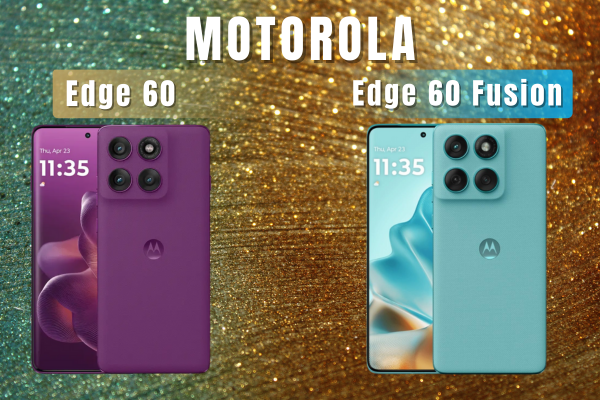
Comparison between Motorola Edge 60 and Motorola Edge 60 Fusion
Hello, iLevante.com community! ? If you are thinking about purchasing one of Motorola's new mid-to-high-end devices, you are likely considering the robust Motorola Edge 60 and Motorola Edge 60 Fusion. Both models promise excellent performance, high-quality displays, and notable durability, but where do the real differences in hardware lie? ?
As experts in hardware and phone repair parts, we know that surface-level specs don't always tell the full story. This analysis is designed for the user who values their device's longevity and wants to know if the price difference is justified in key internal components. We'll delve deeply into crucial elements such as storage (UFS), processing, and, most importantly for repairs, the durability of the full screen, the battery, and the USB-C charging port. Keep reading to make an informed decision!
An Introduction to the Dynamic Duo of Motorola: Beyond Aesthetics
Motorola has launched the Edge 60 series with two models that, at first glance, share an identical premium aesthetic: both feature high-resolution curved pOLED screens and boast industry-leading durability certifications. This external similarity is intentional, but expert analysis should focus on internal architecture, as hardware differences directly impact long-term performance and the likelihood of requiring replacement parts.
In terms of physical durability, both devices are extremely sturdy. Both feature the same robust IP68/IP69 certification, meaning they offer maximum protection against dust and water (immersion of up to 1.5m for 30 minutes and high-pressure water jets). Additionally, they meet the MIL-STD 810H military durability standard. This level of protection, combined with the use of Gorilla Glass 7i on the front, reduces the likelihood of accidental damage. However, we'll see how this resistance doesn't always translate into an easy repair when damage is inevitable.
The Hardware Factor: Speed, Processing, and Memory for Your Motorola Edge
This is where the similarities start to diverge and where the user seeking long-term performance needs to pay closer attention. Processing and storage components define not only the device's current speed but also its smoothness and responsiveness over the years.
Power and Chipset: Dimensity 7400 vs 7300
Both models use powerful MediaTek Dimensity processors built on an efficient 4-nanometer (4nm) architecture, a factor contributing to excellent energy efficiency and, consequently, battery health.
- Motorola Edge 60: Features the Dimensity 7400, which in its India version uses Cortex-A78 cores clocked at 2.6 GHz.
- Motorola Edge 60 Fusion: Uses the Dimensity 7300, with Cortex-A78 cores clocked at 2.5 GHz.
The impact of this small CPU frequency difference is minimal. In everyday tasks and moderate gaming, performance will be almost indistinguishable since both chips share the same core architecture (Octa-core) and the same GPU (Mali-G615 MC2). The RAM selection also varies; the Edge 60 can be found with up to 12 GB, while the Fusion offers 8 GB LPDDR4X in some configurations.
Why is the Type of Storage (UFS 4.0 vs 2.2) the Key to Longevity? ?
If a hardware component truly differentiates these two phones and justifies the extra investment in the Edge 60, it is the internal storage technology UFS (Universal Flash Storage). This technology is the most important factor that isn't apparent in the spec sheet but directly affects the device's speed and perceived durability.
- Motorola Edge 60 (Pure Speed): Utilizes the UFS 4.0 standard.
- Motorola Edge 60 Fusion (Cost-Effective): Utilizes the earlier UFS 2.2 standard.
Technically speaking, UFS 4.0 is dramatically superior. Performance tests show that it offers sequential read speeds up to three times faster and sequential write speeds up to ten times faster than UFS 2.2.
For the user, the difference is noticeable in the smoothness: on the Edge 60, apps open instantly, video game load times are minimal, and 4K 30 FPS video recordings are processed and saved effortlessly. In contrast, the Edge 60 Fusion, using UFS 2.2, may experience slower performance opening apps or transferring large files, especially as storage fills up. UFS 2.2 slowness can cause the SoC to wait longer for data, potentially increasing processing time and generating more heat, a factor that can contribute to long-term battery degradation if used for intensive tasks. For prolonged usage, the Edge 60 provides a more solid hardware base resistant to technological aging.
Essential Technical Specs and High-Value Replacement Parts
The following table summarizes the most important hardware components, crucial for both purchasing decisions and potential key part replacements.
| Feature | Motorola Edge 60 | Motorola Edge 60 Fusion |
|---|---|---|
| Dimensions (mm) | 161.2 x 73.1 x 7.9-8.2 | 161 x 73 x 8.0-8.3 |
| Protection / Chassis | Gorilla Glass 7i / Plastic Frame | Gorilla Glass 7i / Silicone Polymer (Vegan) |
| Durability Certification | IP68/IP69, MIL-STD 810H | IP68/IP69, MIL-STD 810H |
| Display (Type and Resolution) | 6.7" pOLED, 1.5K (2712x1220), 4500 nits | 6.7" pOLED, 1.5K (2712x1220), 4500 nits |
| Processor (SoC) | Dimensity 7400 (4nm) | Dimensity 7300 (4nm) |
| Internal Storage | 256GB / 512GB (UFS 4.0) | 256GB (UFS 2.2) |
| Main Camera | Triple: 50 MP OIS + 10 MP Telephoto + 13 MP UGA | Dual: 50 MP OIS + 12 MP UGA/Macro |
| Front Camera | 50 MP | 32 MP |
| Battery (Capacity) | 5200 mAh | 5200 mAh |
| Fast Charging | TurboPower 68W | TurboPower 68W |
Highlights and Key Component Advantages
The pOLED Display and Battery represent the major technical tie between both models. Both models offer the same 6.7-inch pOLED panel with 1.5K resolution (2712x1220) and an impressive maximum brightness of 4500 nits, providing identical visual quality. The autonomy is also identical, thanks to a robust 5200 mAh battery with support for TurboPower 68W fast charging. For the replacement market, this implies that specifications for the full screen and battery are either compatible or quite similar in complexity and replacement cost.

The Camera is where the Edge 60 takes the lead. This model features a triple-camera system, including a 50 MP main sensor with OIS and, crucially, a dedicated 10 MP telephoto lens enabling advanced zoom capabilities. Additionally, the Edge 60 doubles its front camera resolution to 50 MP, surpassing the Fusion?s 32 MP, making it ideal for portraits and high-definition video calls.
Strengths by Model: What Does Each One Excel At?
The final decision depends on whether the user prioritizes sustained performance or value for money while maintaining overall durability.
- Motorola Edge 60: Maximum Performance and Professional Photography ?
Its standout feature is the UFS 4.0 storage speed. This technology ensures long-term fluidity, making the phone feel fast and agile even as future updates roll out. It?s the superior choice if professional photography and uncompromised speed are essential.
- Motorola Edge 60 Fusion: Durability and Budget-Friendly ?
Its main appeal is offering the premium display and battery (4500 nits, 5200 mAh) with maximum certified durability (IP68/IP69 and MIL-STD 810H) at a lower cost. It?s ideal for the user prioritizing protection against the elements and autonomy, accepting the slight limitation of UFS 2.2 storage.

Common Failures and Weaknesses: Hardware and Replacement Needs ??
It?s essential for iLevante.com users to know the recurring weak points of the Edge series since these are the components most likely to require repair or replacement.
Common Failures Generating Replacement Demand (Both Models)
- USB-C Charging Port Issues: One of the most consistent weak points in Motorola?s Edge series is the charging module. Users have reported failures where the phone detects the charger but enters "slow charging mode" or disconnects repeatedly during data transfer. This electrical failure often requires charging module replacement or the associated charging flex cable. It?s a low-cost replacement and a common repair for DIY enthusiasts.
- Fragility of the Curved Screen: Despite its water and dust resistance, the curved shape of the pOLED screen, while aesthetically superior, increases the surface vulnerable to side impacts in falls. A break in this high-resolution screen (1.5K) is common and requires the purchase of a full screen.
- Premature Battery Wear Due to Overheating: While the 4nm Dimensity processors are generally efficient, thermal management under extreme load in previous Edge models has prompted reports of overheating. Constant heat can degrade the maximum capacity of the lithium battery (5200 mAh) over time. When used intensively for gaming or 4K video recording, users should anticipate the need for a battery replacement earlier than expected.
Internal Repairability: The Adhesive Challenge
External resistance, like MIL-STD-810H certification, doesn?t necessarily imply easy internal repairability. The process of changing the screen or battery in the Edge 60 Fusion, for example, has an internal repairability score of 6.0/10.
Technicians point out that the difficulty lies in the strong adhesive used on both the back cover and the battery. For any internal repair, heat application and solvents (alcohol) are required for safe disassembly. Even though the screen and battery cable are accessible, removing plastic covers on the motherboard adds steps to the repair, meaning that while DIY is possible, the operation requires proper tools and experience. This complexity increases the demand for replacement parts on specialized platforms.
Which Motorola Edge 60 Should You Choose?
Both devices are workhorses with nearly identical designs and displays. The choice boils down to whether you are willing to pay for next-generation data transfer speed and enhanced photographic capabilities.
?? Choose the Motorola Edge 60 Fusion: If your priority is to get the best value for money in durability and autonomy while enjoying the spectacular pOLED screen and the large 5200 mAh battery, even if apps take a fraction of a second longer to load due to UFS 2.2 storage.
?? Choose the Motorola Edge 60: If you seek technological longevity and the best possible hardware experience. The integration of UFS 4.0 ensures that the phone maintains fluidity throughout its lifespan, better resisting hardware aging. Additionally, it is the clear choice for photography enthusiasts who require a telephoto lens and a 50 MP front camera.
Remember, no matter how durable your device is, hardware components such as the full screen, USB-C charging module, and battery have finite lifespans. To ensure that your Motorola Edge 60 or Edge 60 Fusion continues to operate at its best, at iLevante.com, we have all the original replacement parts you need for your repairs.






