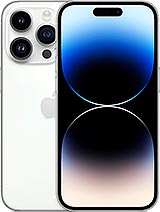
3200 mAh iPhone 14 Pro battery
Sound familiar? You leave home with 100% battery, but by mid-afternoon you’re already looking for a socket, and your iPhone 14 Pro warns you that its battery health has dropped below 85%. You may even notice it stuttering when you open the camera. You’re not alone. When the 14 Pro reached its first anniversary, many users reported that its maximum capacity had fallen to 87% or 90%, much sooner than usual for an iPhone. Apple designs its batteries to retain around 80% of their original capacity after approximately 500 full charge cycles. Below that point, your iPhone may start limiting performance to prevent unexpected shutdowns.
The solution costs much less than replacing your phone. This 3200 mAh battery for iPhone 14 Pro restores the capacity your phone had when it left the factory. It also comes with a free tool kit and free adhesive strips, so you won’t need to look for anything else to carry out the replacement.
An iPhone 14 Pro battery with the original specifications
The iLevante team has compared this battery with the one fitted by Apple, and the specifications match. It has 3,200 mAh and 12.38 Wh, the same cell Apple introduced in this model, and is 3.4% larger than the iPhone 13 Pro battery (3,095 mAh). That might not seem like much, but the A16 Bionic chip is very efficient and makes excellent use of the battery. With a battery in good condition, Apple quotes up to 23 hours of video playback, 20 hours of streaming and 75 hours of audio playback.
Charging performance is maintained too. With a 20 W USB-C charger, you can reach 50% in around 30 minutes, and MagSafe wireless charging continues to work at 15 W. Replace the battery and keep all the features.
OEM quality: what it means and why it matters
OEM stands for Original Equipment Manufacturer. An OEM battery is made to the same technical specifications as the part originally fitted in the phone: the same dimensions, connector, capacity and protection system against overcharging, deep discharge and excessive temperatures. It fits into its compartment like the original and connects to the board in the same way. In practice, your iPhone treats it as what it is: a battery made for it.
Compatibility: check your model in ten seconds
Go to Settings > General > About and tap the model number once to see the reference beginning with “A”. This battery is compatible with all iPhone 14 Pro variants:
- A2890: the version sold in Spain and almost all of Europe.
- A2650: United States.
- A2889: Canada, Japan and Mexico, among others.
- A2892: mainland China, Hong Kong and Macau.
- A2891: Russia and neighbouring countries.
Please note: it is not compatible with the iPhone 14 Pro Max, which has a differently shaped 4,323 mAh cell.
How to replace the iPhone 14 Pro battery: the iLevante team’s guide
There’s one detail many people only discover once their phone is on the workbench. The standard iPhone 14 opens from the back, but the iPhone 14 Pro opens from the front by lifting the screen. This is a medium-difficulty repair and takes between one and two hours if you take your time. The kit we include has the essentials. We’d also recommend having a hairdryer, opening picks and isopropyl alcohol with a concentration of over 90% to hand.
Before you start
- Discharge the battery to below 25%. A fully charged lithium cell is much more dangerous if damaged.
- Switch off your iPhone completely and work on a clean surface, using a tray or mat to keep the screws organised. There are 17 screws of different types and lengths in total, and putting a long screw in the wrong hole can damage the logic board.
Step-by-step guide to replacing the iPhone 14 Pro battery
- Remove the two P2 pentalobe screws on either side of the Lightning port.
- Warm the edges of the screen for a couple of minutes to soften the adhesive. Place the suction cup at the bottom, pull gently and insert an opening pick.
- Run the pick around the edges. Here’s the most common mistake: on the right and top sides, don’t insert the pick more than 3 mm, and on the left side, never more than 2 mm, as the screen flex cables run there.
- Open the screen like a book, from the right-hand side, and rest it on something stable so you don’t strain the cables.
- Remove the metal connector cover (the Y000 screws are different lengths). Disconnect the battery first, then disconnect the two screen flex cables.
- Remove the bottom speaker and the Taptic Engine to access the adhesive strips. One of the screws is a standoff and requires its own bit.
- The battery is held in place by three pull-tab adhesive strips, two along the bottom edge and one along the top. Pull them slowly, keeping them flat and without pressing on the battery. If one breaks, a few drops of isopropyl alcohol under the edge will soften the adhesive. Never use a metal tool to pry against the cell.
- Fit the new strips included with your order, position the battery and connect it. Before closing the phone, turn on your iPhone and test it: image, touch, Face ID and charging. This saves you from having to open it again.
- Disconnect it again, reassemble everything in reverse order, seal the screen and force-restart the phone.
The “unknown part” warning and other common issues
It’s best to know this in advance, as it’s the question we’re asked most often. When you install a battery that hasn’t gone through Apple’s parts system, your iPhone will usually display the “Important Battery Message” warning. It first appears on the Lock Screen for a few days, then remains under Settings > General > About > Parts and Service History as an unknown part. The battery health percentage may also stop appearing. Apple confirms that this warning does not affect how the phone works: the battery charges, lasts and functions normally.
Here are some other issues we often see in the workshop:
- The iPhone won’t turn on after the repair. It’s almost always a connector that isn’t seated properly. Open it again and carefully press the edges of the connector, never the centre, as the pins can bend.
- Face ID or the screen isn’t working. A flex cable has usually been strained while opening the phone or hasn’t been connected properly. That’s why we recommend testing everything before closing it.
- Water resistance. Lifting the screen breaks the original seal, and the iPhone loses its IP68 rating. To restore protection against splashes and dust, fit a new screen adhesive seal.
- Swollen battery. If the old battery is bulging, don’t puncture or bend it; take it to a battery recycling point.
Get the most out of your new iPhone 14 Pro battery
Now that your cell is like new, look after it. The iPhone 14 Pro doesn’t have the 80% charge limit introduced with the iPhone 15, but it does have Optimised Battery Charging under Settings > Battery. It learns your routine and delays charging the final part of the way. Leave it enabled. Avoid charging your phone in direct sunlight or inside a car in summer, as heat wears lithium batteries down more than anything else. If you notice the battery life dropping, try turning off the always-on display.
Here’s a tip few people know: you can check how many charge cycles your battery has, even though the 14 Pro doesn’t show them in Settings. Go to Privacy & Security > Analytics & Improvements > Analytics Data, open the latest “log-aggregated” file, copy the text into a note and search for “batterycyclecount”. This lets you see exactly when you’ll need your next replacement—which should be quite a while with this battery.
If your iPhone 14 Pro runs out of battery before dinner, everything you need is in one order: 3200 mAh OEM battery, free tool kit and free adhesive strips. Add it to your basket and use your iPhone again without constantly looking for a charger.
• Product Weight: 0.10 kg.The technical specs of Apple iPhone 14 Pro
can help you to choose the correct repair part for your device. Make sure your model reference is the same as this element. Here are some tech specs to help you:
- Brand: Apple
- Apple iPhone 14 Pro Size: 147.5 x 71.5 x 7.9 mm.
- Release date: 2022, September 07.
- Weight: 206 g.
- Screen specs: LTPO Super Retina XDR OLED, 120Hz, HDR10, Dolby Vision, 1000 nits , 2000 nits.
- Screen size: 6.1 inches, 91.7 cm2.
PVP:
SNK.AS11903214.90€ AvailableInStockNewCondition