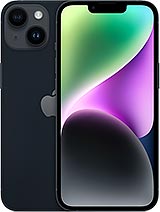
3279 mAh iPhone 14 battery: get your phone's battery life back
One day, your iPhone 14 starts asking for its charger halfway through the afternoon. It just doesn't last like it used to. This happens with all lithium-ion batteries and is perfectly normal: Apple designs the iPhone 14 battery to retain around 80% of its capacity after 500 full charge cycles. If you charge it every day, you'll reach around 300 cycles in a year. You can do the maths. Many users see their battery health drop to between 87% and 90% before their phone is a year old, and the decline becomes much more noticeable from the second year onwards.
This Premium-quality iPhone 14 battery has a capacity of 3279 mAh, the same as the battery originally fitted by Apple. Get your phone's day-one battery life back without replacing it.
iPhone 14 battery specifications
The iLevante team has compared this battery with the original, piece by piece. Here are the key specifications:
- Capacity: 3279 mAh
- Energy: 12.68 Wh
- Nominal voltage: 3.87 V
- Chemistry: lithium-ion (Li-ion)
- Equivalent Apple battery: A2863
- Product reference: AP140004
A curious detail: Apple never announces the mAh capacity of its iPhones. This figure comes from official battery certification records and is slightly higher than the iPhone 13's 3227 mAh. On paper, the difference is small, but with its A15 Bionic chip, the iPhone 14 offers up to 20 hours of video playback, 16 hours of streaming video and up to 80 hours of audio, according to the manufacturer's official figures. With a new battery, you'll be back to getting close to those numbers.
What does Premium quality mean?
A Premium battery is made by an independent supplier to the original specifications: the same dimensions, capacity and connector. It uses high-density cells and a protection circuit that monitors temperature, overcharging and deep discharge. In everyday use, the iLevante team has noticed no difference in performance compared with the original. It's the best-value option for anyone who wants reliable battery life without paying for an official repair.
Compatibility: check your model
This battery is compatible with the standard iPhone 14 only. It won't fit the 14 Plus, 14 Pro or 14 Pro Max, as each model has a different battery shape and capacity. Compatible models are:
- A2649
- A2881
- A2882
- A2883
- A2884
To find your model number, go to Settings > General > About and tap the model number until the one starting with “A” appears.
What's included with your iPhone 14 battery
The battery comes with free adhesive strips, designed to fit its compartment and keep it securely in place against the frame. We also include a tool kit to open your phone and replace the battery without needing to buy anything else. A screen protector is not included, as you don't need to touch the screen for this repair.
How to replace the iPhone 14 battery: lessons from the iLevante team
The iPhone 14 brought a surprise during teardowns. Apple changed its internal design, and the rear glass can be removed—something we hadn't seen for years. You access the iPhone 14 battery from the back, not through the screen. This makes the repair much easier, although there are a few things to watch out for. Allow one to two hours the first time. With practice, you can bring this down to around 40 minutes.
Before you open the phone
Make sure the battery is below 25%. A discharged battery is much less dangerous if accidentally punctured. Back up your data and switch the phone off completely. If you notice that the old battery is swollen—for example, if the rear glass is lifting—take extra care and don't press on it.
Steps to replace the iPhone 14 battery
- Remove the two pentalobe screws on either side of the charging port.
- Heat the bottom edge of the rear glass until it is too hot to touch comfortably. Apply a suction cup and create a small gap.
- Insert an opening pick and run it along the sides and top to cut through the adhesive. Do not insert the pick more than 3 mm. Going further could damage the charging coil cable, the cameras or a very thin cable next to the volume-up button.
- Open the glass like a book, to one side. It is still connected to the board by a cable, so don't pull it off suddenly.
- Remove the battery connector cover (two 1.3 mm screws) and disconnect the battery. Then remove the charging coil cover (one 1.0 mm screw) and disconnect its cable, which is short and becomes taut quickly.
- Some units have a small white adhesive sheet beneath the battery cable. Lift the cable with tweezers and remove it.
- Remove the battery adhesive strips as explained below, then take out the old battery.
- Clean off any adhesive residue, apply the new strips, fit the new battery and press it firmly into place.
- Reconnect the battery and turn the phone on before closing it. If everything works, switch it off, refit the covers and close the rear glass.
The adhesive strips: where most people get stuck
The iPhone 14 battery is held in place by two pull-tab adhesive strips. They work like picture-hanging strips. Pull each tab slowly, flat and towards the top of the phone, without pressing on the battery. Take your time. If you pull sharply, the strip will snap. If it breaks and you can still see part of it, wrap it around your tweezers and continue pulling. If you can't see any of it, apply a few drops of concentrated isopropyl alcohol, wait a minute and lift the battery with a plastic tool.
And here's something we always stress: never pry with a metal tool or bend the battery. A punctured lithium cell can smoke or catch fire within seconds.
The rear adhesive and water resistance
Opening the iPhone breaks the seal that gives it its IP68 rating. The phone will still work without it, but it loses its protection against water and dust unless you fit a new seal to the rear glass. If your phone often gets wet, order the rear seal separately. You won't regret it.
After installing your iPhone 14 battery
Calibration during the first few days
To help the percentage indicator work properly from the start, the iLevante team recommends a simple calibration process:
- Charge the battery to 100% and leave it plugged in for about two more hours.
- Use the phone normally until it switches off due to a low battery.
- Charge it back to 100% without interruption.
If the phone restarts by itself or gets stuck on the Apple logo after you've closed it, first check the battery connector. A poorly seated connector causes more problems than anything else. Open the phone again, press the connector down until you feel it click into place, then force restart the phone.
How to extend the life of your new battery
- Turn on Optimised Battery Charging in Settings > Battery.
- Don't leave your phone in the sun or charge it under your pillow. Heat ages the battery more than anything else.
- Use certified chargers. A cheap, uncertified charger can strain the cell without you noticing.
And if replacing the battery feels a little daunting, don't worry—it's perfectly normal. With the included tool kit and these steps, many members of our community have managed to do it at home on their first try. If you're unsure about your model, the iLevante team is here to help before you open your phone.
• Product Weight: 0.10 kg.The technical specs of Apple iPhone 14
can help you to choose the correct repair part for your device. Make sure your model reference is the same as this element. Here are some tech specs to help you:
- Brand: Apple
- Apple iPhone 14 Size: 146.7 x 71.5 x 7.8 mm.
- Release date: 2022, September 07.
- Weight: 172 g.
- Screen specs: Super Retina XDR OLED, HDR10, Dolby Vision, 800 nits , 1200 nits.
- Screen size: 6.1 inches, 90.2 cm2.
PVP:
SNK.AS11903012.55€ AvailableInStockNewCondition