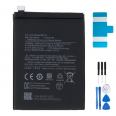
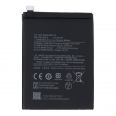
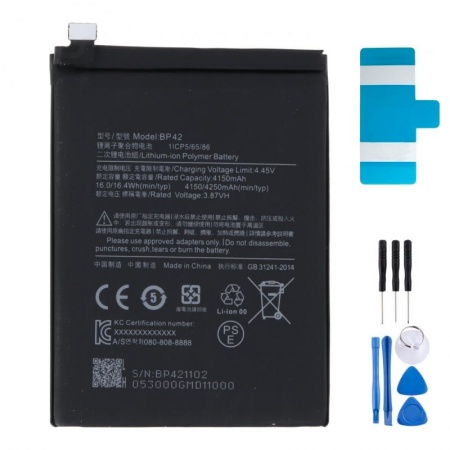
4250mAh Xiaomi Mi 11 Lite BP42 Battery
You probably know the situation. You leave home with 100% battery, check your phone halfway through the morning and it is already down to half. By the afternoon, you are searching for a socket as if you were looking for water in the desert. This happens quite often with the Mi 11 Lite, and there is an explanation: Xiaomi designed it to be extremely slim, just 6.81 mm, so the battery had to be made to fit down to the last millimetre. When new, it performs brilliantly. After several charging cycles, the loss of performance becomes noticeable, and sooner than with thicker phones.
This 4250mAh BP42 battery is the exact replacement for the Xiaomi Mi 11 Lite (4G), the Mi 11 Lite 5G and the Xiaomi 11 Lite 5G NE. All three models use the same cell, so it does not matter which one you have. If your phone is one of these models, it will fit.
What does it mean for the Xiaomi Mi 11 Lite battery to be OEM?
OEM stands for Original Equipment Manufacturer. In simple terms, this is a battery manufactured to the same specifications as the one originally fitted in your phone, with the same capacity, voltage, dimensions and connector. This is why your Xiaomi recognises it without any issues and continues to charge at 33W, just like it did when new: around 60% in half an hour and a full charge in just over an hour and fifteen minutes.
There is one detail that often confuses people. You will see two figures on the cell itself: 4150 mAh and 4250 mAh. Nothing is missing: the first is the nominal capacity (the guaranteed minimum), while the second is the typical capacity, which is the figure advertised by Xiaomi. The original battery has exactly the same dual labelling.
- Model: BP42
- Capacity: 4250 mAh (4150 mAh nominal)
- Voltage: 3.87 V, lithium polymer
- Approximate energy: 16.4 Wh
- Compatible with: Mi 11 Lite (M2101K9AG), Mi 11 Lite 5G (M2101K9G) and 11 Lite 5G NE (2109119DG)
- Includes: battery adhesive and, as a free gift, 1 tool kit
How to know if your Mi 11 Lite battery has reached the end of its life
There is a trick that hardly anyone knows about. Open the phone app and dial *#*#6485#*#*. A hidden diagnostic menu will open. Look for two values: MF_05 (the remaining capacity) and MF_06 (the factory capacity). Divide the first by the second to get the battery health percentage. If it drops below 80%, our team considers it time to replace the battery. In the same menu, under MF_02, you can also see the number of charging cycles it has completed.
If you would rather rely on what you can see, these are the signs most often reported by customers who come to us with a Mi 11 Lite:
- The final 10% disappears in an instant, or the phone switches off while still showing 15 or 20%.
- It gets hotter than usual while charging.
- It only works when connected to the charger.
- The rear cover lifts at one corner, or the phone rocks when placed on a table.
Pay attention to the last point. A raised rear cover is usually a sign of a swollen battery. Do not press it back into place. Switch the phone off, do not charge it and replace the battery as soon as possible.
Before blaming the battery, however, check one thing. Many Mi 11 Lite phones start using more power immediately after an update, or because the screen is set to 90 Hz with the brightness at maximum. If your battery reports good health but still does not last long, first try reducing the refresh rate to 60 Hz. This can provide around 12% more battery life.
What you will notice with a new Xiaomi Mi 11 Lite battery
With a new cell, this phone feels like itself again. As a reference, a new battery provides around 9–10 hours of continuous use in work and office productivity tests. With normal use (social media, WhatsApp, some video and photos), it comfortably lasts until the evening. The 11 Lite 5G NE can even last slightly longer because its processor is somewhat more efficient. If you are in a hurry one day, five minutes connected to the charger will provide several hours of moderate use.
If you have been wondering whether it is worth replacing your phone or repairing this one, we will be straightforward. The Mi 11 Lite is still a light and attractive phone with a good display, so at the price of this battery from iLevante, it is well worth giving it a second life.
Replacing the Xiaomi Mi 11 Lite battery: what you need to know before opening the phone
We are not going to pretend otherwise: this is a medium-difficulty repair. You need to remove the rear cover, which is made of glass and firmly glued in place. Allow between 30 and 60 minutes and do not rush. The free tool kit helps with the delicate parts of the job (suction cup, opening picks and screwdriver). You will also need a hairdryer and some patience.
- Discharge the battery below 25% before starting. If you accidentally puncture it, the risk is much lower.
- Switch off the phone, remove the SIM tray and heat the edges of the rear cover with the hairdryer. It should be hot, but not burning.
- Place the suction cup, lift slightly and gradually insert the opening picks. If the adhesive hardens, apply more heat. This is where most covers break, so take your time.
- Remove the 11 screws from the cover protecting the motherboard. The first connector to disconnect is the battery connector.
- There is a graphite sheet and a SIM flex cable crossing over the battery. Separate them carefully and do not bend the flex cable at an angle.
- The original battery has two orange pull tabs, marked A and B. Pull them slowly and horizontally. If one breaks, a few drops of isopropyl alcohol along the side will soften the adhesive. Never lever the battery out by bending it.
- Clean away any residue, fit the new battery using the included adhesive, connect it and switch on the phone before closing it to check that everything works correctly.
A workshop tip: have new adhesive ready for the rear cover. The original adhesive can almost never be reused, and without it the cover will be loose and will no longer protect the inside properly.
After the replacement, complete a couple of full charging cycles so that the system displays the percentage correctly. From then on, our team recommends keeping the battery between 20% and 80% whenever possible and enabling optimised charging overnight. This is the simplest way to help the battery last for years. Please note that batteries do not include a screen protector.
• Product Weight: 0.07 kg.The technical specs of Xiaomi Mi 11 Lite 5G
can help you to choose the correct repair part for your device. Make sure your model reference is the same as this element. Here are some tech specs to help you:
- Brand: Xiaomi
- Xiaomi Mi 11 Lite 5G Size: 160.5 x 75.7 x 6.8 mm.
- Release date: 2021, March 29.
- Weight: 159 g.
- Screen specs: AMOLED, 1B colors, HDR10+, 90Hz, 500 nits , 800 nits.
- Screen size: 6.55 inches, 103.6 cm2.
PVP:
SNK.AS15588210.95€ AvailableInStockNewCondition